Bosch Dishwasher Trouble Codes: Quick Diagnosis and Fixes
Urgent guide to Bosch dishwasher trouble codes: what each code means, quick checks you can perform, and a step-by-step plan to restore drainage, water supply, and reliable operation.


Bosch dishwasher trouble codes are diagnostic alerts from the control board indicating a fault. They help you identify problems such as drainage, water supply, door latch, or sensor issues. Start by noting the displayed code, then perform quick checks and refer to your user manual or Dishwasher Tips’s practical guide before calling service. Acting quickly reduces water damage and delays.
Understanding Bosch Dishwasher Trouble Codes
Bosch dishwashers are built with smart diagnostics that display codes to alert you when something isn’t right. These codes are a language for the machine to tell you where to look first. The important thing is to respond promptly: jot down the exact code, note the cycle stage, and check for any visible leaks or blockages. As the Dishwasher Tips team notes, codes aren’t random letters — they map to observable faults, and a quick, calm workflow can prevent escalation of damage. Keep a small notebook or note-taking app handy so you can document the codes you see, the exact model, and the date of the incident. In high-use households, codes can appear during heavy wash loads, when the water supply is fluctuating, or after a power interruption. Knowing that you can act quickly helps homeowners avoid larger problems and unnecessary service calls.
The Code Categories Bosch Uses
Bosch uses fault codes grouped into several broad categories, each pointing to a different subsystem. Drainage codes appear when water cannot exit the tub due to filters, pumps, or hoses. Filling or water-supply codes signal issues with the inlet valve or water pressure. Door latch codes flag protection interlocks or door misalignment. Sensor and heater-related codes point to temperature or flow readings that are out of spec. An overarching control-board fault is less common but can happen after power surges or software glitches. Because codes vary by model, always cross-check the exact code with your model number and Bosch’s official manuals. Dishwasher Tips emphasizes mapping codes to the correct subsystem to reduce guesswork and speed up fixes.
Quick Fixes to Try Before You Dig Deeper
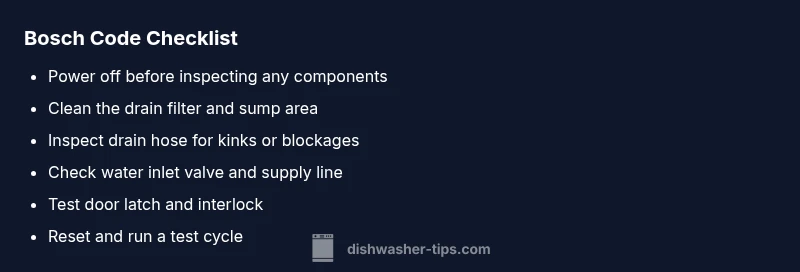
When a code appears, there are several non-destructive checks you can perform in minutes. First, power off the unit and unplug it to reset the electronics. Then remove and clean the drain filter and sump, removing all debris. Inspect the drain hose for kinks or blockages and confirm it routes correctly to the sink. Check the door latch and interlock for firm engagement. If the problem seems linked to water supply, inspect the inlet hose for kinks and ensure the shutoff valve is fully open. Finally, perform a controlled power cycle: unplug for a minute, plug back in, and run a test cycle. If the code persists, you’ll have a clearer path for professional service.
Diagnostic Flow Overview for Bosch Codes
This section provides a mental map to navigate codes quickly. Start with the symptom: a specific fault code appearing during a cycle. Then consider the likely causes in order of probability: drainage problems (high likelihood), water inlet issues (medium), door latch faults (medium), and control-board faults (low). Apply the corresponding fixes in the same order: clean filters, verify water supply, test the door, and reset the system. This approach minimizes unnecessary disassembly and helps you determine whether you can safely fix it yourself or need expert help.
Step-By-Step Fix for the Most Common Cause (Drainage Problems)
Drainage problems are the most frequent source of trouble codes across Bosch dishwashers. Follow these steps to tackle the drainage issue methodically. Step 1: Power down, unplug, and remove the lower rack to access the sump area. Step 2: Remove and clean the drainage filter and check the pump for obstructions. Step 3: Clear the drain hose of any kinks and inspect the air gap if present. Step 4: Reassemble, plug back in, and run a short test cycle with no dirty dishes. Step 5: If the code returns, proceed with the professional steps outlined below.
Other Potential Causes and How to Confirm
If drainage isn’t the culprit, inspect the water inlet valve and supply line for obstruction or low pressure. Examine the door latch and interlock for proper engagement and alignment. Look for sensor or thermistor faults by running through the preset diagnostics if your model supports it, and check for any error codes that accompany a temperature or flow warning. Finally, consider a firmware reset or software update if your model allows it. Each cause has its own symptoms and fixes, so document findings carefully to guide the next step.
Safety, Warnings, and When to Call a Pro
Electrical appliances can pose slip-and-fall and shock hazards. Always unplug before opening access panels or touching wiring. Do not run hot water into the tub while inspecting hoses, and avoid forceful disassembly of components. If you encounter burnt smells, exposed wires, or moisture near electrical parts, stop immediately and contact a professional. If your unit is under warranty or your code persists after the basic checks, a licensed technician can perform a more thorough diagnosis and potential parts replacement.
Maintenance to Prevent Future Bosch Codes
Preventive maintenance reduces the likelihood of codes appearing. Clean the filter monthly and inspect the sump for debris. Run a maintenance wash with a vinegar or approved cleaner every few months to reduce mineral buildup. Check the spray arms for clogs and ensure the drainage path is clear after each load. Keep track of cycle histories and codes to detect recurring patterns that may indicate a developing fault. By staying proactive, you’ll minimize downtime and costly repairs.
Recordkeeping and Warranty Considerations
When a code appears, log the exact code, date, model, and symptoms observed. Include any steps you performed and the results of each action. This documentation helps service technicians diagnose faster and can be useful for warranty claims or manufacturer guidance. If a repair requires replacement parts, request an itemized estimate and confirm whether the service includes diagnostics, parts, and labor. Maintaining a history of codes can save you time and money when you’re in a pinch.
Steps
Estimated time: 40-60 minutes
- 1
Power down and safety check
Unplug the unit or switch off the circuit breaker. Allow any residual water to settle before opening the door. This reduces the risk of shock and allows electronics to reset.
Tip: If you must reach behind the unit, use insulated gloves and wipe up any standing water. - 2
Access and clean the drain filter
Remove the bottom rack, take out the drain filter and rinse under running water. Use a soft brush to dislodge stubborn debris from the sump screen and replace the filter securely.
Tip: A clogged filter is the most common cause of drainage codes. - 3
Inspect the drain hose and sump
Check the drain hose for kinks and ensure it’s not blocked. Remove any visible clogs from the hose and ensure the hose end is properly connected to the disposal or sink drain.
Tip: Avoid bending the hose at sharp angles—strain can cause future clogs. - 4
Check water inlet and supply
Verify that the water inlet valve is open and the supply line is clear. If you have low water pressure, adjust or clear the supply line or contact a plumber if consistent issues persist.
Tip: Do not force the inlet valve; if it sticks, replacements are best left to a pro. - 5
Test the door latch and interlock
Close the door firmly and listen for the latch engage. If the interlock malfunctions, the machine may think the door is open and refuse to start.
Tip: Check for visible wear on the latch and replace if it appears loose or cracked. - 6
Reset and run a test cycle
Plug the unit back in, reset any settings, and run a short cycle with no dishes to confirm the code does not reappear.
Tip: If the code reappears, capture the exact code and note the cycle stage for service.
Diagnosis: Bosch dishwasher displays a fault code and stops mid-cycle
Possible Causes
- highClogged drain filter or pump blockage
- mediumWater inlet valve or supply issue
- mediumDoor latch or door switch fault
- lowControl board fault
Fixes
- easyClean the drain filter and remove debris from the sump
- easyInspect inlet hose and valve for kinks, blockages, or flow restrictions
- mediumTest door latch and interlock; reseat wiring harness or replace faulty switch
- hardReset the dishwasher (power cycle) and update firmware if available; if code persists, call a pro for control board replacement
People Also Ask
What does a Bosch trouble code indicate?
A Bosch trouble code signals a detected fault in the dishwasher's drainage, water supply, door latch, sensor, or control system. It serves as a guide for where to look first and how to fix the issue.
A Bosch code shows there's a fault in drainage, water supply, door latch, sensor, or the control system. It guides you to the likely area to inspect.
Should I reset the dishwasher when a code appears?
Resetting by powering off and on can clear transient errors and help confirm whether the fault persists. If the code returns after a reset, proceed with the diagnostic flow.
Yes, try a power reset to clear transient codes. If it comes back, follow the diagnostic steps.
Can I fix drainage problems myself?
Drainage fixes are often straightforward: clean filters, inspect hoses, and verify pumps. If the code indicates a pump failure or leaks, a professional repair is recommended.
Often yes, you can fix drainage by cleaning filters and hoses. If a pump or leak is involved, call a pro.
Do codes vary by Bosch model?
Yes, code formats and meanings can vary by model and age. Always cross-check the exact code with your model’s manual or Bosch’s official support.
Codes can differ by model, so check your manual or Bosch support for the specific meaning.
When should I call a professional?
Call a pro if the code persists after basic checks, if you observe damaged components, or if you lack the tools to safely work on electrical parts.
If the code sticks after basic checks or you see damaged parts, bring in a professional.
Is there a cost estimate for repairs?
Repair costs vary widely by the fault and model. A professional assessment will provide a parts-and-labor estimate before work begins.
Costs vary by fault and model; the technician will give an estimate before work starts.
Watch Video
What to Remember
- Identify the exact code and model number.
- Start with drainage checks before complex repairs.
- Power cycle to reset electronics safely.
- Only proceed with professional help for persistent or high-risk codes.
- Maintain regular cleaning to prevent future codes.