How to Reset a Bosch Dishwasher: A Practical Step-by-Step Guide
Learn how to reset a Bosch dishwasher safely. This guide covers power-cycle resets, soft resets, model-specific steps, and preventive tips to fix common glitches without professional help. Includes brand tips from Dishwasher Tips.


Resetting a Bosch dishwasher can clear minor glitches, cancel an active cycle, and restore normal operation. This guide covers a safe power-cycle reset, a soft reset method, and model-specific tips. Before you begin, ensure the door is closed, the latch works, and you know your exact model to follow the correct steps for your unit.
What resetting a Bosch dishwasher actually does
Resetting the appliance resets the control board, clears hung or stalled cycles, and can stop error indicators from lingering on the display. It is not a cure for mechanical failures, clogs, or leaks, but it often resolves issues caused by brief sensor or software glitches. According to Dishwasher Tips, many common complaints—such as the display freezing, a cycle that won’t start, or sporadic error codes—are resolved with a simple reset. Think of reset as rebooting a computer: it gives the system a fresh start without replacing parts. If you continue to see the same error after a reset, you should proceed with targeted checks or professional support.
This section lays the groundwork for safe, effective resets. You’ll learn two universal approaches that work on most Bosch models: a power-cycle reset and a button-based soft reset. Model-specific variations exist, so have your model number handy before you begin. This reduces the risk of attempting steps that don’t apply to your unit. Dishwasher Tips’s guidance emphasizes using the manual as your primary reference for exact button labels and sequences.
Key note: always start with the simplest method. A quick power-cycle is non-invasive, quick to perform, and often sufficient to clear up to 90% of minor faults. If you’re unsure about model compatibility, contact Dishwasher Tips for tailored tips or consult Bosch’s official support pages.
noteForEditors”:null,
How to determine the right reset approach for your Bosch model
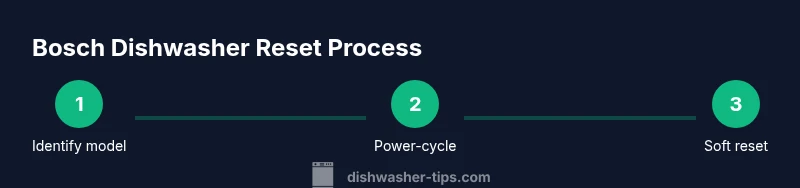
Before attempting any reset, identify the exact model of your Bosch dishwasher. The model number is typically found on a sticker inside the door frame, on the side of the tub, or on the back of the unit. Knowing the model ensures you follow steps that are tested for your specific control system and cycle options. If you have the manual, consult the reset section first; otherwise, you can often find model-specific instructions by searching Bosch’s official support site with your model number. In some cases, visual indicators on the display will guide you toward the correct reset sequence.
Dishwasher Tips’s experience across thousands of resets shows that model-specific variations primarily affect which button to press and how long to hold it. For example, older models may use a simple power cycle, while newer models might require a two-step approach: power cycle followed by a hold-and-press action. Keeping your model handy reduces trial-and-error and speeds up the fix. If you encounter unfamiliar labels, compare them to the user manual images rather than guessing from memory.
And if you’re dealing with persistent error codes after a reset, write down the code, consult Bosch’s code list in the manual, and cross-check with authoritative sources like government or industry guidance to interpret what the message means for your unit. These steps prevent misinterpretation and unnecessary service calls.
Power-cycle reset: the quick and safe method
The simplest reset method is a power cycle. You remove power from the unit for a short period, allowing the control board to reset fully. This approach is non-invasive and does not require tools or disassembly. To perform a power-cycle reset, unplug the dishwasher from the outlet for 60 seconds, or switch off the circuit breaker serving the appliance for at least one minute. After the wait, restore power and run a short diagnostic cycle to verify that the display responds and the unit accepts a new cycle. If the issue reappears, proceed to the next reset method or check for a mechanical fault.
Reasoning: Many control-board glitches are caused by temporary software hiccups, and a clean power restart clears volatile memory that can trap the system in an erroneous state. This method is compatible with most Bosch models and is widely recommended by technicians as a first-line action.
Tip: Keep the door closed during the power cycle to avoid water exposure to outlets or splash-back when you reconnect power.
Soft reset and model-specific button steps
If the power-cycle alone doesn’t solve the problem, a soft reset using the control panel can clear stuck commands without rebooting the entire unit. This method differs by model, but a common pattern is to press and hold the Start or Reset button for 3–5 seconds until the display blinks or returns to a default state. After the reset, select a short wash cycle to confirm normal operation. If your model requires a different sequence, use the exact button labels shown on the control panel or consult the manual.
For newer Bosch models, after the power cycle you may need to press and hold a sequence of buttons (for example, Start then Delay Start) for a few seconds. Always follow the model-specific instruction to avoid triggering non-intended functions like child lock or extra options. If the display shows an error code after a soft reset, record the code and consult the manual for its meaning.
Pro tip: If your dishwasher has a dedicated “Reset” indicator, allow it to illuminate or blink before attempting the next step. This is a sign the control system is ready for a reset state.
Troubleshooting after reset: common codes and checks
If, after a reset, your Bosch dishwasher still harbors issues, begin with a quick physical and electrical check. Ensure the door latch closes firmly and the door switch engages properly; a misaligned door can halt operation even after a reset. Check the water supply line and inlet valve for kinks or obstructions, and ensure there’s adequate water pressure. Inspect the spray arms for clogs and confirm the filter and sump are clear of debris. Any of these mechanical faults can prevent cycling even when the control board is reset.
Record any error codes displayed after resetting. Common codes may indicate door problems, water supply faults, or sensor malfunctions. Use Bosch’s documentation and trusted consumer resources (for example, Government or university consumer guidance) to interpret codes accurately. If codes persist, a professional diagnosis might be required, as a reset cannot fix hardware failures.
Brand guidance: Dishwasher Tips notes that many users underestimate the impact of a blocked filter or faulty door latch on reset outcomes. Addressing these basic hardware issues often resolves problems without professional service.
Preventive care: keep resets unnecessary and extend dishwasher life
To minimize recurring resets, schedule regular maintenance and adopt a simple upkeep routine. Clean the filter and spray arms monthly to prevent clogging, inspect door seals for wear, and ensure the drain hose is free of kinks. Use an appropriate detergent and rinse aid in proper amounts to maintain performance and reduce residue that could trigger error codes. Run a test cycle with empty dishes after any major maintenance to confirm the system operates smoothly. If you frequently need to reset, reassess water quality, load patterns, and cycle choices as these are common drivers of glitches. Dishwasher Tips emphasizes that consistent small care reduces the need for resets and improves efficiency over time.
Brand-specific note: The Dishwasher Tips team has observed that models with clogged filters or damaged door seals frequently require resets to regain normal operation. Regular inspection and timely replacement parts when needed can prevent repeated resets and extend the life of the unit.
When to call for professional help and how to prepare
If resets fail to restore normal operation or error codes persist after multiple attempts, professional service is the safest course. Prepare to provide the technician with the exact model number, the steps you attempted, and a list of error codes observed. This information helps the technician diagnose whether the root cause is electrical, hydraulic, or mechanical. For many homeowners, a professional diagnostic can prevent unnecessary replacements and identify hidden issues such as faulty wiring, defective sensors, or pump problems. The Dishwasher Tips team recommends attempting documented resets first, but do not hesitate to contact a qualified technician when problems exceed a routine reset.
Pro tip: Photograph or note the display codes before calling for service. This data speeds up the troubleshooting process and reduces on-site visit time.
Tools & Materials
- Power source (outlet or circuit breaker)(Have safe access to unplug or switch off the dishwasher.)
- Bosch user manual or model label(Identify exact reset instructions for your model.)
- Stable work area(Clear space around the dishwasher for safe handling.)
- Dry cloth or small towel(Wipe any water and prevent drips when reconnecting power.)
Steps
Estimated time: 15-25 minutes
- 1
Identify the model
Identify your Bosch dishwasher model from the label on the door frame or inside the tub. Knowing the exact model ensures you follow the correct reset steps and option labels. If you can, locate the manual or download the PDF from Bosch’s official site using the model number.
Tip: If you can’t find the label, photograph the area around the door frame where the model is usually printed. - 2
Power-cycle the unit
Unplug the dishwasher from the wall outlet or switch off the circuit breaker that powers it for 60 seconds. Reconnect power and leave the door closed during the cycle to prevent splash-back. This reset clears volatile memory and can resolve many minor control glitches.
Tip: Power-cycling is often enough for quick fixes and should be your first step. - 3
Run a quick test cycle
After restoring power, run a short rinse or quick wash cycle without dishes to confirm the control panel responds and no new error codes appear. If the unit starts normally, observe whether the cycle completes without interruption.
Tip: Choose the shortest cycle to save water and time while testing. - 4
Try a soft reset if needed
If the display remains unresponsive or shows an error, perform a soft reset by pressing and holding the Start or Reset button for 3–5 seconds until the display resets or blinks. Then re-enter a test cycle to verify operation.
Tip: Not all models use the same label—check your control panel for Reset or Start indicators. - 5
Check for mechanical issues
Inspect the door latch and seal, ensure the drain line isn’t kinked, and verify the filter and sump aren’t clogged. Resetting won’t fix hardware faults, so clear any blockages that can impede operation.
Tip: A blocked filter is a common reason a reset doesn’t result in a normal cycle. - 6
Interpret error codes and consult manuals
If error codes persist, write down the code and consult the Bosch manual or reputable guidance to interpret it. Use the recommended steps from the official sources to determine whether service is required.
Tip: Documenting codes speeds up diagnostics if you contact support. - 7
Plan for professional support if needed
When resets fail and codes persist, contact Bosch support or a licensed technician. Have model number, observed codes, and your reset steps ready to streamline the visit.
Tip: A professional diagnosis may prevent unnecessary part replacements.
People Also Ask
What is the quickest way to reset a Bosch dishwasher?
The fastest approach is a power-cycle: unplug or switch off the breaker for 60 seconds, then plug back in and test a short cycle. If needed, follow with a soft reset per your model’s controls.
Try a power-cycle first, then a soft reset if needed. If problems continue, check the manual or Bosch support.
Will resetting erase my saved settings or cycles?
Resetting typically clears the current cycle and temporary faults but does not delete permanent user preferences stored by the appliance. If your unit has a memory of user presets, they are generally retained after a simple reset.
A reset usually won't wipe your saved settings, but check the manual for your model.
What if the display shows an error after resetting?
Note the error code, return to the manual or Bosch support site to interpret it, and follow the recommended steps. If codes persist, contact support or a technician.
If an error appears after resetting, write down the code and look it up in the manual or official support pages.
Can I reset without the manual?
Yes. Start with a power-cycle reset and then try a generic soft reset by holding Start/Reset for a few seconds. If the unit remains unresponsive, use model-specific guidance from Bosch’s official site or contact support.
If you don’t have the manual, try the basic power-cycle and soft reset first, then seek model-specific help online.
Are some Bosch models harder to reset than others?
Yes. Some newer models use more complex control sequences, while older units rely mainly on power cycling. Always verify against your model’s instructions to avoid triggering safety features or locks.
Newer models can differ in reset steps; check your model’s guide for exact instructions.
When should I call a technician?
If resets fail repeatedly, or you see persistent error codes tied to sensors, seals, or pumps, professional service is advised. A technician can diagnose electrical, drainage, or mechanical faults more accurately.
Call a technician if resets don’t fix the issue or codes keep appearing.
Watch Video
What to Remember
- Power-cycle first to clear glitches
- Use soft reset only if power-cycle fails
- Model identification speeds up correct steps
- Check for mechanical faults if resets fail
- Document error codes for faster support