Problems with Samsung Dishwasher: Troubleshooting Guide for 2026
Facing problems with samsung dishwasher? This urgent, practical guide from Dishwasher Tips walks homeowners through common causes, safe checks, and when to call a pro in 2026.


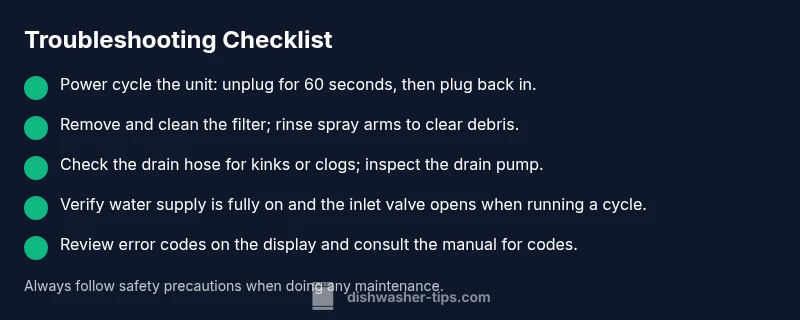
Most problems with Samsung dishwashers come from clogs in the filter or drain, a faulty door latch, or a blocked spray arm. For a quick fix, start by cleaning the filter and under the tub, running a short wash to flush debris. If the problem persists, check the drain hose and water supply lines for kinks or leaks.
Common causes of problems with Samsung dishwashers
According to Dishwasher Tips, the most frequent issues with Samsung dishwashers typically involve drainage, filtration, and water intake. A clogged filter or spray arm can prevent proper cleaning, while a failing door latch can stop cycles from starting or completing. Debris in the pump or an obstructed drain hose can lead to standing water or poor drainage. Electrical or control-board glitches, though less common, can cause misreads or failed cycles. Understanding these root causes helps homeowners triage quickly and avoid expensive, unnecessary repairs. Regular maintenance reduces the odds of these problems recurring and keeps your Samsung dishwasher operating at peak efficiency.
Quick Diagnostics You Can Do At Home
If you’re experiencing a problem, begin with safe, simple checks before digging into internals. Verify the unit is plugged in and that the circuit breaker hasn’t tripped. Listen for a confirming latch click when you close the door. Check the display for error codes and note them down. Run a short cycle with the door closed to see if the unit starts. Make sure the kitchen sink drain isn’t clogged, as a blocked sink can impact dishwasher drainage.
How to Inspect the Filter, Spray Arms, and Pump
Begin by removing the bottom rack to access the filter basket and spray arms. Rinse the filter under running water, removing all debris until water runs clear. Inspect each spray arm hole for clogs and clear them with a thin tool or pin. If the arm spins but water doesn’t reach all areas, there may be a blockage in the sump or pump. Reassemble and run a cleaning cycle with your preferred dishwasher-safe cleaner to flush remaining debris.
Water Inlet Valve and Drainage Checks
A weak water inlet valve or restricted supply will leave your dishwasher inadequately filled, affecting cleaning performance. Check the inlet screen for mineral buildup and ensure the supply valve is fully open. For drainage issues, examine the drain hose for kinks or obstructions and inspect the pump housing for debris. If standing water remains after a cycle, consider testing or replacing the inlet and drain components.
Electrical Control Panel and Error Codes
Some Samsung dishwashers display error codes that indicate sensor or controller faults. If codes appear, refer to the user manual to interpret them. A soft reset—unplugging the unit for 60 seconds and plugging back in—can clear temporary faults. If codes persist after reset, the issue may be more serious and require professional service or board replacement.
Cleaning Cycle Tips to Improve Performance
Running a cleaning cycle with a dishwasher-safe cleaner or a vinegar rinse can help dissolve mineral build-up, especially in hard-water areas. Avoid mixing chemicals in the same cycle; never combine bleach with ammonia. Use the correct detergent pod or powder per manufacturer guidance, and ensure you’re using the appropriate rinse aid for better drying performance. Regularly inspecting seals, gaskets, and door latches prevents leaks and misreads.
Prevention and Maintenance Routines to Avoid Future Problems
Create a simple maintenance schedule: monthly filter and spray-arm cleaning, quarterly descaling for hard water, and an annual professional check if your warranty allows. Use a high-quality detergent and appropriate pods or powder. Keep the door area clean to avoid misalignment, and never force the door if the latch feels stuck. These practices minimize performance degradation and extend your appliance’s life.
When to Call a Professional and Warranty Considerations
If basic checks don’t resolve the issue or you notice gas-like smells, exposed wiring, or significant leaks, it’s time to contact a licensed technician. A professional can diagnose electrical or control-board faults and verify that wiring and safety interlocks are functioning properly. If your unit is under warranty, consult Samsung support or your retailer for coverage criteria and authorized service providers to avoid voiding coverage.
Steps
Estimated time: 60-75 minutes
- 1
Power cycle and reset
Unplug the dishwasher, wait 60 seconds, then plug back in. This resets most basic electronics and can clear temporary faults. If an error code remains, note it for reference.
Tip: Plug the unit back in and run a short test cycle with no dishes. - 2
Clean the filter and spray arms
Remove the bottom rack, extract the filter assembly, and rinse under running water. Use a soft brush to dislodge stuck debris from spray arms. Reassemble and run a cycle to test cleaning performance.
Tip: Check for bent spray arms and ensure they spin freely. - 3
Check the drain hose and pump
Inspect the drain hose for kinks or clogs; detach and inspect the pump filter if accessible. Clear any debris and reattach securely before testing a cycle.
Tip: Have towels ready; drainage work can release residual water. - 4
Inspect water inlet and supply
Verify the water supply valve is fully open and the inlet screen is clean. If the valve seems stiff or not opening, it may require replacement.
Tip: Avoid using hot water to test; cold water is usually sufficient to check flow. - 5
Test control panel and door latch
Close the door firmly and listen for a latch click. If the panel shows codes, refer to the manual or Dishwasher Tips for code meanings.
Tip: If a child lock is engaged, disable it before troubleshooting. - 6
Run a cleaning cycle with descaler
Run a maintenance cycle using a dishwasher-safe cleaner or descaler per the manual. This helps remove mineral buildup that reduces cleaning efficiency.
Tip: Never mix descaler products with other cleaners in the same cycle. - 7
Check float switch and vent
Ensure the float moves freely and isn’t stuck in the raised position, which can falsely indicate the tub is full. Confirm vents aren’t blocked by debris.
Tip: Gently move the float by hand to verify smooth operation. - 8
Review error codes and reset
If codes appear, write them down and consult the manual or Dishwasher Tips for interpretation. Perform a final reset if codes clear after the cycle.
Tip: Document codes for future service visits. - 9
When in doubt, call a professional
Electrical faults, gas smells, or persistent leaks require a licensed technician. A pro can diagnose sensor or control-board failures safely.
Tip: Check warranty status before scheduling a paid visit.
Diagnosis: Dishwasher won't start or drains poorly
Possible Causes
- highPower issue or tripped circuit breaker
- highFaulty door latch or misaligned door
- highClogged filter, spray arms, or pump debris
- mediumDrain hose kink or blocked drain line
- lowWater inlet valve not opening
Fixes
- easyCheck outlet and reset circuit breaker; ensure the plug is firmly seated
- easyInspect and reseat the door latch; replace if damaged
- easyRemove and clean the filter; inspect spray arms for clogs and clean
- mediumInspect drain hose for kinks; clear clogs at the end and check the pump filter
- mediumIf the inlet valve is suspected, replace or call a pro; involves shutting off water supply and handling electrical connections
People Also Ask
Why won't my Samsung dishwasher start?
Power issues, a faulty door latch, or a control panel lock can prevent starting. Check the outlet, reset the circuit, and ensure the door latches properly.
If your Samsung dishwasher won’t start, check power, door latch, and any control locks; reset the circuit if needed.
Why is water not draining from a Samsung dishwasher?
A clogged filter, pump debris, or a blocked drain hose commonly causes poor drainage. Clean the filter and inspect the hose, then run a test cycle.
Water not draining? Check the filter, pump, and drain hose for clogs, then test run.
Why is my dishwasher not cleaning dishes properly?
Blocked spray arms, clogged filters, or insufficient water temperature can reduce cleaning efficiency. Clean components and ensure hot water supply during cycles.
Dishes not clean? Inspect spray arms and filters, and ensure hot water supply.
Why is there a foul odor from the dishwasher?
Food debris and stagnant water can cause smells. Clean the filter and tub, run a cleaning cycle, and ensure proper drainage.
Foul odor? Clean the filter, run a cleaning cycle, and fix drainage.
What do error codes on a Samsung dishwasher mean?
Error codes point to specific sensor or control issues. Refer to the manual or Dishwasher Tips for exact meanings and recommended actions.
Error codes point to sensor or control problems; check the manual for meanings.
When should I call a professional?
If basic checks don’t resolve the issue or you encounter potential electrical hazards or leaks, contact a licensed technician. Warranty coverage may apply.
If basic checks fail or there are electrical or leak concerns, get a professional.
Watch Video
What to Remember
- Start with basic checks: power, latch, and drainage.
- Clean filters and spray arms to restore cleaning power.
- Inspect water supply and inlet valve for proper operation.
- Use error codes with the manual to guide fixes.
- Call a professional if safety or critical components are involved.