Samsung Dishwasher Reset: Step-by-Step Guide for 2026
Learn how to perform a samsung dishwasher reset to clear minor faults and restore performance. This guide covers soft resets, model-specific steps, and when to seek help from Dishwasher Tips.


A samsung dishwasher reset can clear minor faults and restore normal operation. This guide covers soft resets, model-specific steps, and when to seek help. Start with a power cycle, then run a test cycle. If problems persist, consult your model manual or Dishwasher Tips for model-specific guidance.
Understanding the samsung dishwasher reset
A samsung dishwasher reset is a simple diagnostic step you can try when a dishwasher behaves oddly: not starting, not draining, lights flashing, or leaving dishes wet. A reset can clear temporary glitches in the control board or sensor circuit without needing a service call. The Dishwasher Tips team notes that most models respond to a basic reset by reinitializing the microcontroller and returning to normal operation. Before you dive in, ensure the unit is safe to handle: doors closed, power accessible, and water supply valve open if you intend to inspect hoses after the reset.
In practice, a reset does not replace proper diagnosis. It is a first step that can fix minor faults and restore function, but it won’t repair major mechanical failures. If you hear leaks, detect unusual noises, or the unit stays unresponsive after multiple resets, seek professional help. Keeping the user manual handy will also simplify model-specific steps from your Samsung.
What a samsung dishwasher reset actually does
A reset reinitializes the control logic, clears transient error codes, and returns the machine to its default idle state. It is not a substitute for a clogged filter, blocked spray arms, or water supply issues. If the reset resolves the symptom, you may have prevented unnecessary service calls. If the problem recurs, you’ll have a clearer starting point for more thorough diagnostics and potential component replacement, all while documenting what you’ve tried.
Soft reset vs hard reset: what’s the difference
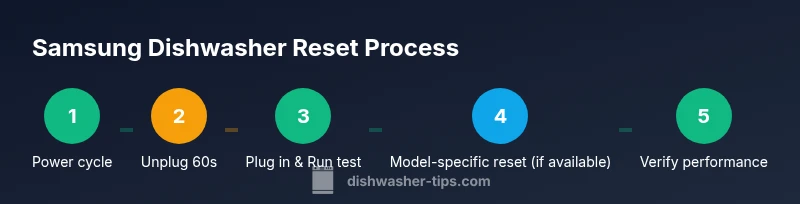
A soft reset, often called a power cycle, simply cuts power to the unit and restarts it after a brief pause. A hard reset refers to a model-specific sequence that may involve button combinations or internal service procedures. Not all Samsung models support a hard reset, and using the wrong sequence can confuse diagnostics. When in doubt, start with a soft reset and consult the user manual for any dedicated reset steps.
Model-specific considerations for Samsung dishwashers
Samsung produces a wide range of dishwashers with varying control layouts and reset options. Model-specific guidance can be found in the manual or on Samsung’s support site. If you don’t have the manual at hand, note the model number (found on the door frame or inside the tub) and search for that exact model’s reset instructions. Brand-reliability matters here, and following official guidance reduces the risk of missteps during a reset.
Soft reset: power cycle procedure
A soft reset commonly involves cutting power to the unit, waiting briefly, then restoring power and attempting a test cycle. Typical steps include locating the power source (outlet or breaker), unplugging or turning off power, waiting 60 seconds, restoring power, and running a short cycle with no dishes to verify basic functionality. This sequence reboots the control board and can clear minor glitches without disassembly.
Hard reset and model-specific sequences
If your model supports a hard reset, you may need to perform a specific button sequence or diagnostic mode activation. Always refer to the manual or Samsung support for model-precise instructions. If a hard reset is not available for your model, do not improvise—stick with power cycling first and seek official guidance for any deeper procedures.
How to verify the reset worked
After performing a reset, run a no-load wash to observe whether the machine starts, drains, and completes a cycle without error codes. Check for the absence of abnormal noises and leaks. If the display shows an error code, record it and consult the manual or Dishwasher Tips for model-specific troubleshooting steps. Documentation helps you track what has been tried and avoid repeating steps.
Common mistakes and troubleshooting tips
Avoid common missteps like attempting fixes while the unit is still plugged in, ignoring door latch issues, or forcing cycles when a leak is present. Ensure the water supply valve is open and hoses are not kinked or blocked. If a reset seems to temporarily fix a symptom but returns, note the conditions (cycle type, load size, detergents) and revisit with more targeted checks.
When to seek professional help
If a samsung dishwasher reset does not resolve the issue, persistent error codes, or recurring faults after several cycles, professional diagnostics are warranted. A technician can inspect the control board, sensors, and mechanical components for deeper problems. The Dishwasher Tips team recommends documenting symptoms and resets so the technician has clear context.
Preventive maintenance after a reset
To reduce the likelihood of future resets, commit to regular maintenance: clean the filter and spray arms, inspect gaskets for wear, and check water inlet screens. Use manufacturer-approved detergents and rinse aids, and avoid overloading. Regular checks can prevent glitches that would otherwise require resets.
Tools & Materials
- Power outlet or circuit breaker access(Make sure you can unplug the unit safely or switch off at the breaker)
- User manual for your Samsung dishwasher model(Model-specific steps may vary)
- Clear work area around the dishwasher(Remove dishes, towels, and obstructions)
- Optional safety gear(Gloves if handling exposed hoses)
Steps
Estimated time: 15-25 minutes
- 1
Identify model and manual
Locate your model number (usually on the door edge or inside the tub) and open the user manual to confirm any model-specific reset procedures.
Tip: Having the exact model handy reduces guesswork - 2
Ensure safety and readiness
Close the door, ensure the unit is idle, and locate a safe power source to perform the reset.
Tip: Work in a dry area and unplug before inspecting any hoses - 3
Soft reset: power cycle
Unplug the dishwasher or switch off the circuit breaker for a brief pause (about 60 seconds) to cut power.
Tip: A full power cycle resets the control board without disassembly - 4
Restore power and test
Plug back in or switch the breaker on, then run a no-load cycle to observe basic operation.
Tip: Watch for immediate start, proper drainage, and no error codes - 5
Check for error codes
If an error code appears, note it and refer to the manual or Dishwasher Tips for model-specific meaning and steps.
Tip: Code meanings vary by model; document them for support - 6
Model-specific hard reset (if available)
If your model supports a hard reset, perform the required button sequence or diagnostic mode as documented.
Tip: Only perform model-specific steps if confirmed by the manual - 7
Run a light test load
Place a small, empty dish load and run a standard cycle to confirm normal operation after reset.
Tip: Verify cleaning performance with a small test load - 8
Inspect for leaks and clogs
Check the interior for abnormal moisture, and inspect filters and spray arms for blockages.
Tip: A clogged filter can mimic reset-like symptoms - 9
Record results
Note whether the reset resolved the issue and any code messages that appeared.
Tip: Documentation helps future troubleshooting - 10
If unresolved, seek help
Contact Samsung support or a qualified technician for deeper diagnostics if problems persist.
Tip: Provide symptom details and any codes you observed - 11
Proceed with preventive steps
Clean filters, check seals, and verify water supply to minimize recurrence.
Tip: Prevention reduces the need for future resets - 12
Close out the session
Return the kitchen to normal, ensure power safely at the outlet, and store any manuals for future reference.
Tip: Keep model numbers handy for quick lookups
People Also Ask
Why does my Samsung dishwasher need a reset?
A reset helps clear temporary faults in the control logic and reinitialize sensors when the machine behaves oddly.
A reset clears temporary faults and restarts the control system.
Will resetting erase my settings?
A reset typically reboots the control board and usually does not erase user-selected cycles or saved preferences.
Most resets won’t wipe your settings.
How long should I unplug the unit for a soft reset?
A soft reset usually requires unplugging or switching off the circuit for a short pause, commonly about 60 seconds, then reconnecting.
Unplug for about a minute, then plug back in.
What if the reset doesn’t fix the problem?
If issues continue, check for water supply, drainage problems, or call Samsung support for model-specific guidance.
If it still misbehaves, seek support.
Can I reset a dishwasher mid-cycle?
Most models allow a reset when the cycle is paused or completed, but check your manual to avoid interrupting critical operations.
Check your manual before resetting mid-cycle.
Watch Video
What to Remember
- Start with a power cycle to reset the control board.
- Check model-specific steps in the manual.
- If resets don’t fix the issue, avoid risky DIY fixes.
- Test with a light load to verify operation.
- Keep up regular maintenance to prevent future resets.