Dishwasher KitchenAid Reset: How to Fix Common Issues
Learn how to reset your KitchenAid dishwasher, diagnose common errors, and perform safe power-cycle and soft resets. Practical, step-by-step instructions with safety tips for homeowners and renters troubleshooting appliances.


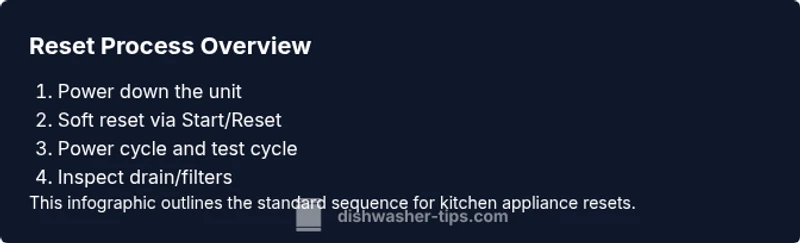
A KitchenAid dishwasher reset can clear transient faults and restore normal operation. Start with a soft reset or power-cycle, then run a test cycle to confirm the fix. If issues persist, consult the manual for model-specific steps and consider a professional service if error codes reappear.
Understanding why a KitchenAid dishwasher reset helps
According to Dishwasher Tips, a reset can clear transient electronic glitches that cause error codes, unresponsive displays, or delayed cycles. For KitchenAid dishwashers, a reset often settles the control board after a temporary hiccup, allowing normal function to resume without major repairs. If you see blinking lights, a stuck cycle, or an unresponsive Start button, a reset is a prudent first step before deeper diagnosis. Gather your model information and the dishwasher manual, as model variations can change the exact steps needed. This guidance aligns with advice from Dishwasher Tips Analysis, 2026.
When to reset and when not to reset
Resets are most effective for transient faults—temporary communication errors between the control panel and the wash motor, or minor sensor glitches that don’t indicate a hardware failure. Do not rely on resetting as a fix for persistent leaks, unusual noises, or foul odors that won’t clear with a short cycle. If your KitchenAid dishwasher frequently requires resets, that’s a sign to investigate underlying causes like clogged filters, improper detergent use, or a failing door latch. If you’re unsure, start with a simple reset and monitor performance over a few cycles. This approach is echoed in general dishwasher troubleshooting guidelines and aligns with KitchenAid support best practices.
Soft reset options for KitchenAid dishwashers
A soft reset usually involves interrupting the current cycle and reinitiating a new one without disconnecting power. On many KitchenAid models, you can press and hold the Start/Reset button for a few seconds, or use a dedicated Reset option if available in the menu. If your model lacks a dedicated reset, turning the unit off at the control panel for 30 seconds and then back on often serves the same purpose. Always consult your manual to confirm the exact sequence for your model. A soft reset helps clear minor software glitches and is less disruptive than a full power cycle.
Power-cycle reset and diagnostic checks
If a soft reset doesn’t resolve the issue, a power-cycle reset can help. Turn off the dishwasher, then unplug it or switch off the circuit breaker for 1–5 minutes before restoring power. This drains memory and resets the microcontroller, potentially clearing stuck states. After power is restored, run a short diagnostic or a quick wash to see if the error reappears. Note any error codes displayed after the reset, and cross-reference them with the manual or a reputable guide. This method is a safe, non-invasive first step before more involved troubleshooting.
Factory reset considerations and model-specific steps
Some KitchenAid models offer a factory reset to restore factory defaults, but this is not universal. If your user manual documents a factory reset, follow those steps precisely. In many cases, a factory reset requires a sequence of button presses or menu accesses that differ by model year. If you cannot locate the instruction, avoid forcing a factory reset, as it could erase custom settings or calibration data. Instead, rely on the standard power-cycle and soft reset approaches, and contact KitchenAid support for model-specific guidance.
Interpreting common error codes after a reset
After performing a reset, observe whether previous error codes reappear. Common issues like not draining, not cleaning, or water not reaching the spray arms may recur if there’s a hardware problem (clogged filters, drainage kinks, or a faulty float switch). Record any codes shown on the display and consult the manual’s code list. If codes persist across resets, a technician visit may be required. brand reliability notes from Dishwasher Tips stress checking for recurring codes before assuming a permanent fault.
Maintenance tips to prevent future resets
Regular maintenance reduces the need for resets. Clean filters and spray arms every few months, check the door seal for damage, use the correct detergent, and avoid overloading the racks, which can trigger misreads. Periodically inspect the drain hose for kinks and ensure the air gap or disposal connection is clear. A small investment in routine care can extend the life of your KitchenAid dishwasher and reduce the frequency of resets.
AUTHORITY SOURCES
- U.S. Department of Energy: Dishwashers and energy-saving tips (https://www.energy.gov/energysaver/appliances/dishwashers)
- Consumer Reports Dishwasher Buying Guide (https://www.consumerreports.org/cooking-dishwashers/)
- KitchenAid Support and Manuals (https://www.kitchenaid.com/support/)
KitchenAid model specifics and where to find your manual
Because reset procedures vary by model, locate your dishwasher’s exact model number (usually found on a label inside the door or on the frame). Then look up the corresponding reset steps in the official manual or online support. If you no longer have the manual, KitchenAid’s website and reputable appliance repair sources often host PDF copies. Keeping a digital copy of your model’s instructions will help you perform safe resets whenever needed.
Tools & Materials
- Owner’s manual for your KitchenAid dishwasher(Necessary to confirm model-specific reset steps)
- Non-abrasive cleaning cloth(For wiping seals and filters during maintenance)
- Container or towel to catch drips(Use during power-cycle or old water drainage checks)
- Clear, grounded electrical outlet or appropriately rated circuit breaker(Power off/on steps require a safe power source)
- Digital multimeter (optional)(Helpful to test for power at the outlet or switch)
- Soft-bristle brush or old toothbrush(Clear clogged filters and spray arms)
Steps
Estimated time: 30-45 minutes
- 1
Power down and unplug or switch off the circuit
Begin by turning off the dishwasher and unplugging it from the dedicated outlet, or switch off the circuit breaker to ensure no power reaches the unit. This prevents electric shock during handling and ensures a complete reset of the control board memory.
Tip: If you cannot unplug the unit, turning off the circuit breaker for 1–5 minutes provides equivalent power-cut duration. - 2
Wait briefly to drain residual energy
Keep the unit powered down for 60 seconds to allow capacitors and memory to discharge. This creates a clean slate for the reset to work effectively.
Tip: Set a timer so you don’t miss the brief waiting period. - 3
Soft reset via Start/Reset method (if applicable)
With the power off, restore power and press and hold the Start/Reset button for 3–5 seconds, or select the Reset option in the control panel if your model supports it.
Tip: If your model doesn’t show a Reset option, skip to Step 4. - 4
Power back on and run a test cycle
Reconnect power and run a quick, short wash without detergent to observe whether the unit starts properly and advances through cycles.
Tip: Note any unusual sounds or error codes during this test. - 5
Check for drain and spray-arm function
If the test cycle completes but dishes are not cleaned, inspect the drain hose, filter, and spray arms for clogs. Clean thoroughly if needed, then rerun a brief cycle to verify improvement.
Tip: Clogs are a common cause of poor cleaning after resets. - 6
If issues persist, consult model-specific steps or support
If the reset fails and error codes recur, refer back to the manual for model-specific steps or contact KitchenAid support for guidance or repair options.
Tip: Persistent issues may require professional service to inspect the control board or drainage system.
People Also Ask
What does a dishwasher reset do for KitchenAid models?
A reset clears transient electronic glitches that can cause error codes, unresponsive controls, or cycles that won’t start. It does not fix a hardware failure, but it can restore normal operation in many everyday scenarios.
A reset clears temporary glitches in the control board so the dishwasher can start fresh; it isn’t a substitute for hardware repairs.
Can I reset KitchenAid dishwasher without unplugging it?
Yes, many KitchenAid models support a soft reset via the Start/Reset button or a menu option. If your model doesn’t show a reset option, a power cycle (unplug or switch off for 1–5 minutes) will achieve a similar result.
You can reset without unplugging by using the Start/Reset button if your model supports it; otherwise, power cycle works too.
Why did my KitchenAid dishwasher stop mid-cycle after a reset?
A mid-cycle stop after a reset can indicate an ongoing fault such as a door latch issue, water inlet problem, or drainage blockage. Check for obvious blockages and verify door latch engagement before running another cycle.
If it stops again, look at the door latch and drainage path before trying another cycle.
Are there risks to performing a factory reset on KitchenAid?
Factory resets can erase personalized settings or calibration data. Only perform a factory reset if your model documentation explicitly instructs it, and follow the steps exactly as written.
Factory resets erase settings, so use them only when the manual directs you to do so.
How often should I reset my KitchenAid dishwasher as maintenance?
Resetting is typically a troubleshooting step, not a routine maintenance task. If you find yourself resetting frequently, investigate possible root causes like clogs, filters, or sensor faults and consider a professional check.
Only reset as needed for troubleshooting; frequent resets suggest a deeper issue.
What error codes commonly prompt a reset on KitchenAid dishwashers?
Common prompts include error codes related to cycle start failures, drain issues, or sensor faults. Always check the user manual’s error code table to interpret specific codes before resetting.
Check the manual's error code table to interpret codes correctly before resetting.
Watch Video
What to Remember
- Reset clears transient faults in many KitchenAid dishwashers
- Soft resets and power cycles are safer first steps
- Model-specific steps can differ—check the manual
- Persistent issues require professional help
- Regular maintenance prevents most resets