Dishwasher Will Not Start: Step-by-Step Troubleshooting Guide
Struggling with a dishwasher that won't start? This step-by-step guide helps homeowners diagnose power, door, and control issues safely and quickly. Learn checks, fixes, and when to call a pro. Updated for 2026.


Dishwasher will not start is most often caused by power, door, or control panel issues. Start by checking the outlet and door latch, then reset the breaker and inspect the keypad. If it still won't start, follow the diagnostic flow below for a thorough check.
Understanding the symptom: dishwasher will not start
Dishwasher will not start is a common kitchen snag that can disrupt daily routines. The root causes are often simple and safety-focused, making a calm, methodical approach essential. According to Dishwasher Tips, the two most frequent culprits are power supply and door mechanism, followed closely by the control panel. A non-start can also hide behind a blocked sensor or a safety lock. In practice, a good diagnosis begins with a quick verification of power, then a visual check of the door latch and seal, and finally a test of the control surface. This block lays the groundwork for a safe, efficient repair path that avoids unnecessary replacements and minimizes downtime. Read on to learn how to separate the quick fixes from the deeper diagnostics, so you can get your dishwasher back in service as soon as possible.
Safety first: unplug, power down, and hazards
Before you touch any wiring or internal components, ensure your personal safety. Unplug the dishwasher or switch off the circuit breaker to eliminate the risk of electric shock. Do not work with the appliance plugged in if you notice damaged cords, scorch marks, or a buzzing sound. Keep water away from outlets and metal components, and use a dry, insulated surface to work on. If you must move the unit, have a second person assist and wear protective gloves. If you smell burning or see melted parts, stop immediately and call a licensed technician. Dishwasher Tips emphasizes safety as the first principle of any DIY repair.
Quick checks you can perform without tools
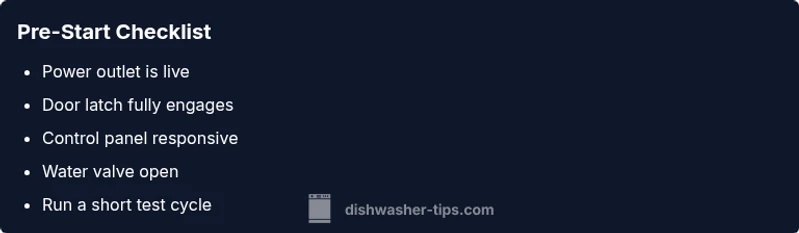
Some root causes are obvious yet easy to miss. Start with the simplest tests: confirm the dishwasher is properly plugged into a live outlet; check that the kitchen circuit breaker hasn’t tripped; and be sure the door is fully closed and latched. If your model has a display, note any error codes or blinking lights and cross-check them in the user manual or online support. Check the control panel for a responsive tap; if the panel is unresponsive, the door latch might be preventing the cycle from starting. Ensure the water supply valve is open and not kinked, as a closed valve can prevent a start in some models. Keep in mind some models require a soft reset or a specific button combination to wake the display before you can start a cycle. This is your first round of fixes before you move into hardware checks.
Electrical checks: power, outlet, and breakers
Power issues top the list of why a dishwasher won’t start. First, verify the outlet is live by plugging in a lamp or phone charger. If the outlet is dead, reset the circuit breaker or replace a blown fuse. If you have a GFCI outlet, reset it and test again. If the outlet works but the dishwasher still won’t start, test the power cord for visible damage and inspect the cord connection to the terminal block. Loose or damaged wires can prevent the controller from receiving a start signal. If you notice burn marks, a buzzing sound, or a smell of melted plastic, stop and call a pro immediately. Many start failures are caused by simple, visible power problems that you can fix safely with basic tools and caution.
Mechanical checks: door latch, door switch, and gasket
The door latch and switch are another frequent culprit. A faulty latch prevents the door from reaching the safety interlock state so the control board won’t start a cycle. Inspect the latch for wear or misalignment and ensure the strike engages smoothly when the door closes. If you have a door switch, test for continuity with a multimeter (if you have one) or simply observe whether the light inside the tub turns off when the door closes. The gasket around the door should seal properly; a damaged gasket can cause misreads that stall the start sequence. If the latch or switch looks worn, replacement is straightforward on many models and can restore functionality without replacing the whole unit. Always unplug before removing panels and follow the service manual for access.
Control panel and sensor checks: reset, codes, and firmware
A non-responsive control panel or lit error codes can prevent starting even when power and doors are ok. Begin with a simple reset: unplug or switch off power, wait 60 seconds, and reconnect. Some models require a specific sequence or holding a button to reset the control board. If an error code appears, consult the user manual or the manufacturer’s website to interpret it and follow recommended steps. A stuck keypad or a failed touch sensor can mimic a dead start. If your dishwasher offers a firmware update, apply it only if recommended by the manufacturer and after ensuring a stable power supply. If the panel remains unresponsive after a reset, the control board could be failing and may require professional replacement.
Water supply and drainage considerations
In some models the start condition is linked to water level or pressure. Check that the water inlet valve is fully open and the supply hose isn’t kinked or blocked. A clogged inlet screen can reduce flow and trigger protective sensors that prevent starting. Ensure the float switch moves freely; a stuck float can falsely signal that the tub is full, preventing a start. Drainage issues typically affect post-run cycles, but a collapsed drain hose or blocked air gap can create backpressure that interferes with initial fill in some machines. If you hear buzzing or see moisture near the bottom, inspect for loose fittings or leaks. A cautious inspection can catch simple issues before they escalate into major repairs.
When to call a professional and prevention tips
If you’ve completed the checks above and the dishwasher still won’t start, it’s time to call a licensed technician. A professional can test the control board, door interlock, and wiring with specialized tools and replace failed components safely. To prevent future start failures, schedule regular door gasket maintenance, keep the interior clean of debris, and run a monthly diagnostic cycle if your model supports it. Use manufacturer-recommended detergents and avoid overfilling that can impact sensors. Keep a simple troubleshooting log so you can spot recurring patterns and share them with the service technician. The Dishwasher Tips team emphasizes proactive maintenance to extend appliance life and minimize downtime.
Steps
Estimated time: 20-40 minutes
- 1
Check power and door
Ensure the unit is plugged in, and the door latch engages fully when closed. If the door remains unlatched, the cycle will not start. Use a flashlight to inspect the latch and striker for alignment.
Tip: Always unplug before inspecting electrical components. - 2
Reset the breaker and cycle
If the outlet has power but the appliance won’t start, reset the household breaker and, if applicable, the dishwasher’s internal breaker. After waiting 60 seconds, plug in and attempt a simple test cycle.
Tip: If you have a GFCI outlet, reset it and test again. - 3
Inspect the door latch and wiring
Visually inspect the latch for wear and ensure the switch engages when the door is closed. Look for loose wires at the terminal block and signs of wear or heat near connections.
Tip: A loose wire can mimic a door fault; secure connections with the power off. - 4
Verify control panel settings
Check for a locked cycle, delayed start, or unresponsive keypad. If the display is blank, perform a reset procedure described in your manual.
Tip: Avoid aggressive button pressing that could misread inputs. - 5
Check water supply and float
Confirm the inlet valve is fully open and the hose isn’t kinked. Move the float gently to ensure it moves freely and isn’t stuck in the up position.
Tip: A faulty float can block startup even if power is fine. - 6
Test a short cycle and observe
Run a short or diagnostic cycle if possible to confirm engagement of start sequence and monitor for unusual noises or error codes.
Tip: Document any codes shown for later reference.
Diagnosis: Dishwasher won't start
Possible Causes
- highPower issue (outlet, plug, or breaker)
- highDoor latch or door switch fault
- mediumControl panel/keyboard lock or fault
- lowWater supply valve closed or kinked hose
- lowTripped GFCI or electrical fault
Fixes
- easyTest outlet with a known-working device; reset or replace breaker if necessary
- easyInspect door latch for wear; replace if damaged; ensure door is fully closed
- easyInspect keypad/lock; reset or disable child lock; consult manual for reset procedure
- easyOpen the water inlet valve; check for kinks in supply line
- mediumIf the issue persists, schedule a professional service
People Also Ask
What is the most common cause of a dishwasher that won't start?
The most frequent reasons are power issues and a faulty door latch. Start by testing the outlet, breaker, and door latch.
Usually it's power or door problems. Check the outlet and door latch, then reset the breaker.
Why does my dishwasher not start after a power outage?
Power outages often require a reset of the breaker and a reinitialization of the control panel.
Power outages often require a reset of the breaker and a fresh start on the control panel.
How do I know if the door latch is faulty?
If the door won't latch or the door light stays on, the latch or switch is suspect.
A door that won't latch or a persistent door light often means the latch or switch needs replacement.
Can a control panel issue prevent starting?
Yes, a stuck key or faulty control board can block start; a reset or replacement may be needed.
Yes, a bad control panel can stop the start. Try reset, and if needed, a replacement.
What steps should I take before calling a professional?
Document symptoms, check breakers, test the valve, and note any error codes.
Document the symptoms and steps you've taken, and note any codes to share with a tech.
Is it safe to troubleshoot power problems myself?
Yes, with safety precautions: unplug power, use insulated tools, and avoid water near outlets.
Yes, as long as you unplug and keep water away from outlets.
Watch Video
What to Remember
- Power and door checks come first
- Reset breakers before deeper checks
- Door latch and control panel are common failure points
- Verify water supply and float if needed
- Call a professional if unresolved