How to Get Dishwasher Out of Lock Mode: A Practical Guide
Learn to safely exit dishwasher lock mode with a clear, step-by-step approach. Troubleshoot causes, perform a safe reset, and know when to call a pro. dishwasher tips


According to Dishwasher Tips, exiting lock mode is a common, manageable fix homeowners can perform with the right steps. This guide shows you how to safely reset the control panel, inspect the door latch, and disable any active lock. By following model-specific instructions and safety precautions, you can restore normal operation without professional help—most issues resolve quickly.
What lock mode means on a dishwasher
Lock mode is a safety feature built into most modern dishwashers. It protects curious kids from starting a cycle by accident and prevents accidental damage to the control panel. When lock mode is active, you might see a padlock icon, the word "Lock" on the display, or a blinking indicator that signals the panel is not accepting input. Exiting lock mode is not a sign of a serious fault; it’s usually a deliberate protection feature that must be reset or disabled according to the model’s instructions. Understanding why your unit shows lock mode helps you decide whether you can fix it at home or need professional help. The Dishwasher Tips team emphasizes that the exact method to disable lock mode varies by brand and model, so always refer to your user manual for the precise sequence.
In many cases, a simple reset of the control panel suffices. If the issue recurs after a reset, it could indicate a secondary problem such as a faulty door latch or control board. Keeping a copy of your model number handy makes it easier to locate the correct steps online or on the manufacturer’s site. This article provides general guidance that applies to most common lock-mode situations while noting model-specific differences.
Common causes of lock mode errors
Lock mode can be triggered by several common scenarios. A persistent child lock on the control panel is the most frequent cause, especially in homes with curious children. Moisture or condensation on the keypad can register stray inputs, accidentally triggering lock mode on touch-sensitive displays. A worn or dirty door latch can prevent the machine from recognizing a safe door closure, which may default to lock mode to protect the appliance. A firmware glitch on older models might also display a lock icon until the system resets. Finally, a temporary power interruption can put the dishwasher into a locked state until it is reset by the user or the control board.
Dishwasher Tips analysis shows that most lock-mode incidents resolve with a standard reset and a quick inspection of the door latch, rather than more involved repairs. If your unit is under warranty, consult the manufacturer’s site for a model-specific reset sequence before attempting any disassembly.
Safety first: prerequisites before attempting a reset
Before you begin any reset or inspection, ensure your safety and the unit’s safety. Unplug the dishwasher from the power outlet to cut all electrical supply. Wait at least 60 seconds to allow the control board to discharge and reset. If your model is hard-wired, turn off the circuit breaker feeding the appliance and confirm the power is off with a multimeter or a tester. Check the door for any visible obstructions and ensure the interior isn’t flooded. Clear any debris from the door seal or latch area that could be falsely signaling a closed door. Have the user manual on hand or access to the manufacturer’s support page for model-specific steps. Dishwasher Tips recommends performing resets with dry hands and on a dry surface to avoid electrical shock.
Step-by-step overview to exit lock mode
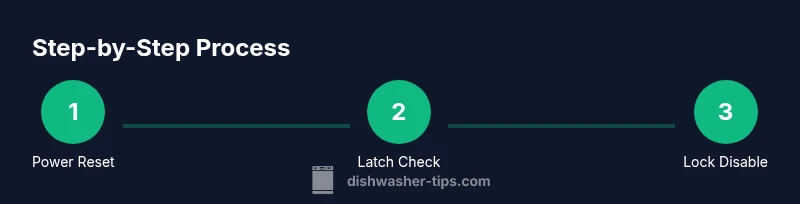
In most cases, you’ll perform a power reset first, then verify the door latch and any lock settings on the control panel. If your model supports a dedicated lock button, pressing and holding it for a few seconds often disables the feature. After disabling lock mode, you’ll test a short cycle to ensure inputs are accepted and the door seals correctly. Always consult the manual for the exact sequence relevant to your model, as some brands require a specific button combination or a timed hold. This overview is intended to supplement the step-by-step instructions found in the dedicated section.
Manufacturer-specific reset sequences and where to find them
Since reset sequences vary by model, locate the exact instructions for your dishwasher by checking the user manual, the manufacturer’s support website, or the appliance’s on-screen help. Search for terms like "lock mode reset," "child lock disable," or "control lock" along with your model number. If you can’t find the exact steps, contact customer support or your retailer for model-specific guidance. The general approach—power reset, latch check, and panel unlock—remains consistent, but the button presses or hold times can differ widely between brands.
When DIY exits fail: what to do next
If you follow the standard reset procedure and the unit remains locked, several issues could be at play: a faulty door latch, a failing control board, or a sensor that misreads door closure. In these cases, DIY attempts may not restore functionality and could void warranties. Resume with manufacturer guidance, consult service instructions, and schedule a professional diagnostic if the lock reappears after a safe reset. Dishwashers vary widely, and a service visit may save you time and avoid further damage.
Maintenance to prevent future lock mode issues
To minimize future lock-mode problems, regularly clean the door latch and seal area to prevent debris buildup. Keep the keypad dry and wipe off any residue or moisture after heavy use or steam cleaning. If your model supports firmware updates, check for updates periodically and install them per the manufacturer’s instructions. Consider placing a small moisture-absorbing desiccant near the control panel area if your kitchen tends to be humid. Finally, set and test a family-friendly lock policy that teaches household members how to disable the lock responsibly without triggering false inputs.
Tools & Materials
- Owner's manual (model-specific lock mode instructions)(Have the exact model number handy to locate reset steps quickly.)
- Access to a standard electrical outlet or circuit breaker(Ensure the power can be safely cut and restored.)
- Flashlight(Helpful for inspecting panels or the latch area in a dim kitchen.)
- Phillips head screwdriver (optional)(Only if you must access a panel or remove a cover plate.)
- Soft cloth or towel(Dry components and prevent moisture near controls.)
Steps
Estimated time: 20-40 minutes
- 1
Power down and unplug
Physically disconnect the dishwasher from power. If you cannot unplug, switch off the circuit breaker for the unit and wait 60 seconds to ensure the control board fully resets. This step clears intermittent glitches that keep lock mode active.
Tip: Always unplug with dry hands and stand on a dry surface to avoid shock. - 2
Inspect door latch and switch
Open the door and visually inspect the latch and switch for signs of wear, debris, or misalignment. Clean any buildup from the latch area and ensure the door closes firmly with a secure seal. A misreading at the latch can cause the display to show lock mode.
Tip: Use a soft cloth and a flashlight to check the latch mechanism thoroughly. - 3
Check for active lock and disable
If your model has a dedicated lock button or a control lock sequence, attempt to disable it. Hold the lock button for 3–5 seconds or perform the model-specific sequence described in your manual. If the display shows a lock icon, ensure no user profiles have inadvertently activated a lock.
Tip: Consult the manual for the exact hold duration; some models use longer presses. - 4
Reconnect power and run a test cycle
Plug the unit back in or switch the circuit breaker back on. Run a short cycle with no dishwasher load to verify inputs are accepted and the door seal operates correctly. If the cycle starts, monitor the display for any return of lock mode.
Tip: Select a quick cycle to minimize water usage during testing. - 5
Model-specific reset if needed
If lock mode persists, perform the model-specific reset sequence noted in the manual or manufacturer site. This may involve a combination of button presses or a timed hold. Do not improvise a sequence not documented for your model.
Tip: Document the steps you take so you and future owners can repeat them. - 6
Call a professional if the lock returns
If the lock reappears after a safe reset, a door latch fault or control board issue is likely. Schedule a service appointment with a qualified technician to diagnose wiring, sensors, and the control module.
Tip: Avoid opening internal panels beyond what’s described in the manual to prevent damage.
People Also Ask
What does the 'Lock' icon on my dishwasher mean?
The lock icon usually indicates a child or control lock is active. Disable it via the keypad, a dedicated lock button, or a model-specific sequence described in your manual.
A lock icon means the panel is protected. Use the manual to disable it with the right button press.
Can I reset the lock by unplugging the dishwasher?
Yes, a power reset is often effective. Unplug the unit for about a minute, then reconnect and test a cycle.
Unplug for a minute, plug back in, and test a cycle to reset the panel.
What should I do if the lock stays after a reset?
If the lock persists, there might be a faulty door latch or control board. Check the latch area and consult the manual or a technician.
If it still locks after resetting, a latch or control board fault is likely; seek professional help.
Are lock-mode steps the same for all brands?
No. Lock modes and resets vary by brand and model. Always use the exact steps from your user manual or official support site.
No, different brands have different lock-mode steps; use your manual for accuracy.
Is it safe to perform DIY resets repeatedly?
DIY resets are generally safe if you follow the manual and disconnect power before handling. Avoid disassembly beyond the documented steps.
DIY resets are fine if you follow the manual and disconnect power first. Don’t take it apart unless the manual says to.
When should I call a professional?
Call a professional if the lock reappears after a safe reset, or if you notice signs of moisture or burning smell, abnormal noises, or water leaks.
Call a pro if the lock returns after reset or you see signs of damage or leakage.
Watch Video
What to Remember
- Identify lock mode causes and address them safely
- Power off, inspect latch, and follow model-specific reset steps
- Test with a short cycle before using the dishwasher again
- Escalate to a professional if lock persists after resets