Starting an IFB Washing Machine: A Practical Guide
Learn how to start an IFB washing machine safely and reliably with a practical, step-by-step approach. Cover pre-start checks, loading, detergent use, program selection, startup, troubleshooting, and maintenance.


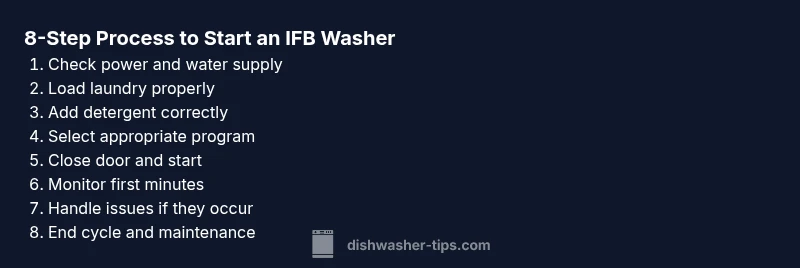
Goal: learn how to start an IFB washing machine safely and reliably. This quick answer highlights essential pre-start checks, loading guidelines, detergent handling, and program selection. Following these steps can prevent common startup errors and set you up for a successful wash every time. The steps below are designed for homeowners and renters who want a calm, confident startup experience, with safety always top of mind.
Understanding how an IFB washer starts
IFB washing machines rely on a coordinated sequence of power, water supply, door locking, and drum control. When you press the start button, the control board initiates a safe startup routine: it checks that the door is securely closed, verifies there’s power stability, opens the water inlet valve, and then gradually begins drum rotation. According to Dishwasher Tips, understanding this startup flow helps you troubleshoot why a unit might fail to start or display an error. By recognizing the signals from the control panel—lights, beeps, and display messages—you can distinguish between a simple reset and a real fault. This knowledge empowers you to troubleshoot confidently, minimizing trips to service centers. Remember, most startup issues are mechanical or electrical, not mysterious malfunctions. Stay calm, follow the sequence, and you’ll maximize reliability and efficiency for every load.
Pre-start safety checks
Safety first. Before you power up, ensure the area around the machine is dry and clear of obstructions. Verify the outlet is grounded and the power cord is intact, with no signs of wear. Check that the water taps are fully open and that the inlet hoses are free of kinks or leaks. Inspect the door seal for debris and ensure the door locks properly when closed. If you have small children or pets, enable any child lock feature to prevent accidental interruptions mid-cycle. These checks minimize the chances of a startup fault, water leaks, or unexpected shutdowns. Dishwasher Tips emphasizes that a methodical approach saves time and reduces stress when issues arise in real life use.
Load, detergent, and water considerations
Load size matters for effective cleaning and efficient startup. Overloading can block the drum and clog the filter, triggering error codes or extended fill times. For IFB machines, evenly distribute clothes around the drum and leave some space for water flow. Use a front-loading, high-efficiency detergent designed for automatic washers; measure as directed by the product label. Use the correct detergent to avoid excessive suds, which can degrade rinse performance or cause drainage problems. Check that the water inlet screens are clean if you notice slow filling. If you’re using soft water, you may need less detergent. Dishwasher Tips notes that proper loading and detergent dosing are as important as the cycle selection itself for a smooth startup and a clean wash.
Program selection and customization
IFB washers typically offer a range of cycles—Cotton, Mix, Synthetics, Wool, and Quick Wash—with configurable options like temperature, spin speed, and soil level. Start by selecting a cycle that matches your fabric type and soil level. For light loads, Quick Wash or Daily Wash may suffice; for heavier denim or towels, Cotton with higher spin and a warmer temperature may be better. Tailor settings to minimize energy use while achieving your cleaning goals. If your machine has a delay-start feature, decide whether you want the wash to start later, which can help balance energy costs or fit your schedule. The key is to choose an appropriate program first, then adjust temperature and spin only as needed.
Starting the cycle and initial monitoring
Close the door firmly and press the Power button, then select your program. Press Start to begin. In the first minutes, listen for the inlet valve engaging and the drum starting to fill and rotate. If the machine displays an error or remains silent, pause and reassess the safety checks. Do not open the door during the fill or agitation phase, as this can splash water and disrupt the cycle. If the model supports sound cues, pay attention to beeps that indicate progression through stages. Monitoring the initial phase helps you catch misfeeds, unbalanced loads, or water supply issues early, saving time and frustration.
Troubleshooting startup issues and quick fixes
If the washer doesn’t start, recheck the door latch, power outlet, and selectable program. A loose door could prevent a cycle from beginning, and a tripped breaker or blown fuse can stop startup. If you notice slow filling or no water, inspect the inlet hose, valve, and screen for blockages. For unresponsive controls, perform a power reset by unplugging for about a minute and plugging back in. If error codes appear, consult your manual for code meanings and recommended actions. Regular maintenance, such as cleaning the filter and seals, reduces startup problems and extends the life of the appliance.
End-of-cycle unloading and maintenance
Once the cycle ends, remove clothes promptly to prevent wrinkles and mildew. Wipe the door seal and drum to remove any residual moisture, which helps prevent mold. Leave the door ajar for a few minutes after unloading to air out the drum. Run a maintenance or cleaning cycle if your model offers one, using a hot water setting and an approved cleaner. Regular checks of hoses, filters, and the power cord help preempt leaks and failures. A simple, consistent routine improves longevity and performance, and reduces the likelihood of startup problems in future washes.
Authority sources and safe practice
Keeping up-to-date with official guidance ensures you follow best practices. See authoritative resources such as Energy.gov, Energy Star, and the Consumer Product Safety Commission for safety and efficiency tips related to washing machines. For direct model specifics, always refer to your IFB user manual and the manufacturer’s official support site. These sources provide safety guidelines, energy-saving practices, and troubleshooting steps that complement practical how-to advice from trusted sources like Dishwasher Tips.
Authority sources (in-depth) for reference
- https://www.energy.gov/eere/buildings/articles/how-energy-efficient-washers-save-energy
- https://www.energystar.gov/products/washers
- https://www.cpsc.gov/News-and-Events/Regulatory-Policy-Summaries
Tools & Materials
- Power outlet with proper grounding(Ensure the outlet matches your region’s voltage and is not controlled by a switch.)
- Water supply hoses with shut-off valves(Check hoses for cracks or wear; ensure valves are easily accessible.)
- Front-loading detergent suitable for HE machines(Use the manufacturer-recommended amount per the labeling.)
- Measuring cup or dosing cap(Helpful for consistent detergent dosing.)
- User manual or model-specific Quick Start guide(Keep within reach for reference on programs and options.)
- Non-slip mat or tray(Plays safe on slick floors and catches minor leaks if any.)
Steps
Estimated time: Estimated total time: 25-45 minutes
- 1
Prepare power and water supply
Ensure the machine is connected to a grounded outlet and the power is stable. Open the water taps and confirm hoses are free of kinks or leaks. This initial setup reduces the risk of a partial fill or electrical fault during startup.
Tip: Double-check the door is closed and the lock indicator is ready before powering on. - 2
Load laundry properly
Place clothes evenly around the drum, avoiding overfilling. Balanced loads reduce vibration and prevent the washing machine from stopping mid-cycle. Close the door firmly to engage the latch.
Tip: If the drum smells damp, run a quick empty cycle to dry it out before starting a full load. - 3
Add detergent and agents
Add detergent to the dispenser as directed by the label. Use a front-loading HE detergent to minimize suds. For large or heavily soiled loads, consider extending the program or using a pre-wash if available.
Tip: Avoid adding fabric softener directly into the drum unless your model requires it. - 4
Select program and options
Choose a cycle that matches your fabric and soil level (Cotton, Synthetics, Mix, or Quick). Adjust temperature and spin speed as needed to balance cleaning power and energy use.
Tip: If your machine offers a soil-level control, set it to medium for typical daily loads. - 5
Start the cycle
Close the door securely and press Start or Power, depending on the model. If there is a delay-start option, decide whether you want the cycle to begin now or later.
Tip: Listen for the inlet valve engage and the drum start. A lack of sound could indicate a water or power issue. - 6
Monitor the first minutes
Watch the initial fill and drum movement. If you notice leaks, unusual noises, or a stall, pause and recheck safety checks and load balance.
Tip: Avoid opening the door mid-cycle; wait for the machine to complete the fill or safety sequence. - 7
Handle issues promptly
If the cycle stalls or error codes appear, unplug for 60 seconds and plug back in to reset. Inspect hoses and filters for blockages.
Tip: Document the error code before calling support to speed up service. - 8
End of cycle and unloading
When done, unload promptly to prevent wrinkling. Wipe seals and leave the door ajar to air out. Run maintenance cleanings as recommended by IFB.
Tip: Regularly cleaning the door seal prevents mold buildup and improves longevity.
People Also Ask
What should I do if the IFB washer doors won't unlock after a cycle starts?
Wait for the cycle to complete or cancel, then retry. If the door remains locked, unplug the machine for a minute and try again. Check for any child lock setting and consult the manual for model-specific steps.
If the door won’t unlock, wait for the cycle, then try a reset by unplugging for a minute and plugging back in. Check for a child lock in your model.
Why is my IFB washer not starting even after pressing the start button?
Possible causes include a tripped breaker, loose power plug, faulty door latch, or an incorrect program selection. Confirm the outlet has power, the door is fully closed, and you have chosen a valid cycle.
If nothing happens after pressing start, check power, door latch, and program selection.
Can I start a wash without water supply?
No. The machine needs a water fill to operate. Ensure taps are open, hoses are connected, and the inlet filter is clean.
No, you need water to fill the drum before the cycle starts.
How do I reset an IFB washer when it becomes unresponsive?
Unplug the unit for about 60 seconds, then plug back in. If still unresponsive, refer to the user manual for model-specific reset steps.
Unplug it for a minute, then plug back in to reset. If it still doesn’t respond, check the manual for your model’s reset steps.
What do error codes like F- or E- mean on IFB washers?
Error codes indicate specific faults; meanings vary by model. Check the manual or IFB support site for code descriptions and recommended actions.
Error codes point to specific issues; consult the manual or official support for exact meanings.
Is it safe to use bleach or strong cleaners to fix startup issues?
No. Harsh cleaners can damage seals and components. Use manufacturer-approved cleaners or contact support for guidance.
Avoid strong cleaners; they can damage parts. Use approved cleaners or contact support.
Watch Video
What to Remember
- Prepare power and water before starting
- Load clothes evenly and avoid overfilling
- Choose an appropriate program and adjust options
- Unplug and reset if issues arise and perform post-cycle maintenance