KitchenAid Dishwasher Diagnostic Codes: Urgent Troubleshooting Guide
Urgent guide to understanding and fixing KitchenAid dishwasher diagnostic codes. Learn how to read codes, identify causes, perform quick fixes, and know when to call a pro.


KitchenAid dishwasher diagnostic codes are fault signals from the control board that identify a fault category. They guide you toward drainage, fill/level, heating, motor/pump, door, or sensor/board issues. The urgent first steps are to power cycle the machine, inspect for clogs or kinks, and clear simple errors. If the code persists, use the diagnostic flow or contact a professional.
What KitchenAid diagnostic codes mean
KitchenAid dishwasher diagnostic codes are fault signals emitted by the control board to indicate a specific fault category. They help you pinpoint issues quickly and limit guesswork during a repair. In 2026, homeowners rely on official manuals or trustworthy online databases for mapping, yet the core pattern remains consistent: codes point to drainage problems, fill or level errors, heating issues, motor or pump faults, door latch failures, or sensor/board faults. Understanding the code category is the first urgent step. According to Dishwasher Tips, the codes generally correspond to one of six core areas, and starting with the simplest fix can save time and money. Many codes require a reset, a quick inspection of filters and hoses, and verifying that the water supply is uninterrupted. If the code persists after basic checks, escalate to the diagnostic flow below or contact a professional for deeper diagnosis. Quick action now can prevent water leaks and wasted detergent, especially in high-use households. KitchenAid uses slightly different code tables across model families, so having your model number handy will help translate codes quickly. When in doubt, treat any code as a potential water leak risk and disconnect power before testing.
How to read and interpret codes on KitchenAid dishwashers
Reading a diagnostic code starts with observing the display or blinking pattern. Many models show a blinking sequence that corresponds to a code, which you then cross-check in the user manual or an official online database. If your model uses an alphanumeric code, write it down exactly as shown. After noting the code, reset the machine as a quick sanity check: unplug for 1-2 minutes or switch off the circuit breaker, then power back on and run a test cycle. If the code returns, you have confirmed a persistent fault rather than a transient glitch. In some models, codes may appear during a specific phase of the cycle (wash, drain, dry), which helps you narrow to the likely subsystem. Keep a simple fault log: code, cycle stage, observed symptoms (leak, noise, no water, poor cleaning). This log will be invaluable when you consult the manual, call support, or compare professional estimates. Finally, consult the official KitchenAid service site or trusted troubleshooting guides for code mapping aligned to your exact model.
Quick checks you can perform before fixes
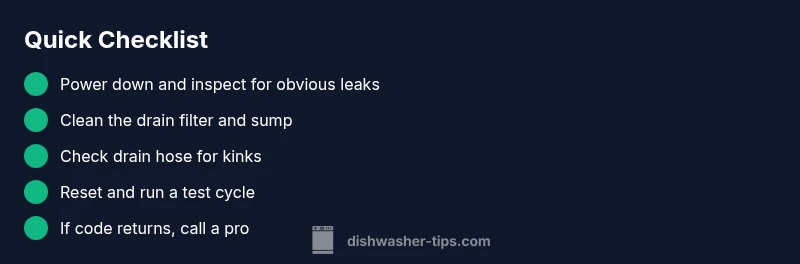
Before diving into repairs, perform the fastest checks that can clear many common codes. Start by safety: unplug the unit or switch off the circuit breaker, then shut off the water supply. Remove the lower rack to access the filter assembly and sump area and check for debris, broken glass, or mineral buildup. Remove and rinse the food grind filter and the pump screen; a clogged filter is a frequent source of drainage or flow-related codes. Inspect the drain hose for kinks, clogs, or trapped air; ensure the hose is properly connected and not looped too high, which can trigger drainage faults. Clean the sump area with a soft brush to remove limescale and sediment. Reassemble and run a short wash cycle to see if the code clears. If the code persists, you will need to follow the diagnostic flow for deeper causes.
Common code categories and recommended actions
- Drainage and pump faults: Clean filters, check for clogs, inspect drain hose, verify the disposal connection if used. If the pump makes unusual noises, do not run it; consult a pro.
- Fill/level errors: Check the water inlet valve, float switch, and water supply; ensure the dishwasher is level front-to-back and side-to-side.
- Heating/temperature faults: Inspect heating element connections, thermostat and wiring; verify the control board is delivering power to the element.
- Door latch and user interface faults: Inspect door latch, hinges, and control panel connectors; replace if failing or loose.
- Sensor/board faults: Look for moisture, burned connectors, or corrosion; a board replacement is often required and should be done by a pro.
In all cases, clear the code with a reset after addressing the root cause and run another cycle to verify the fix. If in doubt, seek professional help rather than risking water damage or electrical hazards.
Step-by-step fix for the most common cause: clogged drain or filter
Even though a professional diagnosis is ideal, the most common fault people encounter is a clogged filter or drain path. This section provides a practical, shop-safe approach to fix it quickly. Start by powering down and unplugging the unit. Remove the lower rack to access the filter housing. Take out the coarse and fine filters and rinse them under running water. Use a soft brush to remove all debris from the sump screen. Re-seat the filter assembly firmly before testing. Check the drain hose for kinks or blockages and ensure it is connected to the air gap (if present) and to the drain line without tight bends. Reassemble, restore power, and run a short empty cycle to verify that the code no longer appears. If the code returns, proceed to a deeper flow diagnosis or contact a technician for pump or valve inspection.
Other causes and how to address them
If the drain/filter fix does not clear the code, other common causes include a malfunctioning inlet valve, a faulty float switch, electrical issues in the heating element circuit, or a damaged door latch that triggers safety interlocks. For inlet valve problems, test with a multimeter and verify water supply; replace if corroded or stuck. For float switch issues, ensure it moves freely and isn’t stuck in the raised position. If the heater element or door interlock is suspected, a professional diagnostic is recommended due to electrical risk and possible warranty implications.
Safety tips and when to call a professional
Safety first: always disconnect power before inspecting internal components. Do not attempt high-voltage repairs, gas checks, or water system replacements without training. If you smell burning, see arcing, or notice a persistent electrical fault, stop and call a licensed technician. If the appliance is under warranty, contact KitchenAid support or an authorized service provider to avoid voiding coverage. For persistent codes after basic troubleshooting, a professional diagnosis is advised to avoid leaks, electrical hazards, or expensive incidental damage.
Prevention and maintenance to reduce future codes
Preventive care is the best defense against recurring diagnostic codes. Clean the filter and sump every 1-2 months with a soft brush and warm water. Run a vinegar or specialized dishwasher cleaner every 3-6 months to curb mineral buildup. Ensure you always load dishes correctly to avoid blockages and improve drainage. Keep the water supply valve fully open and confirm the unit is level. Consider using a high-quality rinse aid and the correct detergent to prevent foaming and streaking. Regular professional checkups can catch worn components early and extend the life of a KitchenAid dishwasher.
Steps
Estimated time: 30-45 minutes
- 1
Power down the unit
Unplug the dishwasher or switch off the circuit breaker to prevent electric shock while you investigate the code.
Tip: Double-check there’s no residual power by using a non-contact tester at the outlet. - 2
Access the filter area
Remove the lower rack and locate the filter assembly and sump area. Remove any visible debris by hand.
Tip: Take a quick photo of the setup before disassembly to aid reassembly. - 3
Clear and rinse filters
Rinse the coarse and fine filters under warm running water, using a soft brush to dislodge stubborn particles.
Tip: Avoid using metal implements that could scratch plastic components. - 4
Check the drain path
Inspect the drain hose and connection to the sink/dwh; remove any kinks or blockages with a flexible brush.
Tip: If your hose has a built-in check valve, ensure it’s seated correctly. - 5
Reassemble and reset
Reinstall the filter housing securely, restore power, and run a short empty cycle to verify the code clears.
Tip: If the code reappears, note the exact pattern and move to a deeper diagnostic. - 6
Test under load
Run a full cycle with a light, non-abrasive load to confirm proper drainage and cleaning.
Tip: If water remains in the sump, stop the cycle and seek professional assistance.
Diagnosis: Dishwasher displays a diagnostic code on control panel
Possible Causes
- highClogged or dirty drain filter/sump
- mediumDrain pump or hose blockage
- lowControl board or sensor fault
Fixes
- easyClean the drain filter and sump screen
- easyInspect and straighten drain hose, remove blockages
- hardTest or replace drain pump / sensors under professional guidance
People Also Ask
What do KitchenAid diagnostic codes indicate?
Diagnostic codes signal a fault category identified by the control board, such as drainage, fill, heating, or door issues. Use the code to guide your checks and repairs.
Diagnostic codes point to a fault category; start with code-specific checks and reset if needed.
How do I reset my KitchenAid dishwasher to clear codes?
Unplug the unit or switch off the circuit breaker for 1-2 minutes, then power back on and run a test cycle. If the code returns, proceed with deeper diagnostics.
Unplug or switch off power for a minute, then try a test cycle again.
When should I call a technician for a KitchenAid code?
If the code persists after reset, involves heating elements, water inlet valves, or electrical components, or you notice leaks, call a professional.
If the code keeps coming back or involves critical components, get a pro.
Are there cost estimates for repairing diagnostic codes?
Repair costs vary by fault and model. Simple fixes may range from roughly $50-$200 for parts and labor, while pump or board replacements can run higher, in the $200-$600 range depending on parts and service.
Costs vary; minor fixes are usually under a couple hundred dollars, major repairs higher.
Can I fix diagnostic codes myself safely?
Non-electrical tasks like cleaning filters and hoses are typically safe for many homeowners. Do not work on live circuits or heating elements without training; call a pro for risky tasks.
You can handle safe cosmetic checks, but leave electrical or heating components to a professional.
Watch Video
What to Remember
- Identify the fault category first before attempting fixes
- Start with safe, quick checks: reset, filter-clean, drain hose inspection
- If codes persist, escalate to STEP-BY-STEP guide for the most common cause
- Call a professional for complex electrical or pressurized systems
- Regular maintenance reduces future diagnostic codes