What to Do When Your Dishwasher Won't Drain
Urgent, step-by-step troubleshooting to diagnose and fix common reasons a dishwasher won't drain. Safe checks, diagnostic flow, and guidance on when to call a professional.


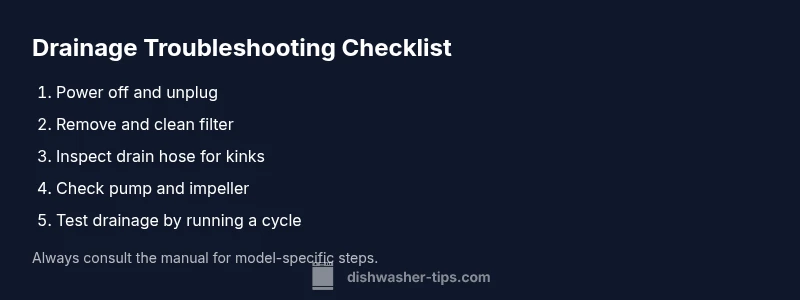
Most drain problems come from a simple clog or a blocked pump path. Start by safely unplugging the machine and inspecting the filter and sump for debris. Remove any food scraps, then check the drain hose for kinks or blockages. If the issue persists, run a short cleaning cycle and test drainage again.
Understanding the problem
Water that remains in the tub after a wash cycle is a clear symptom that your dishwasher is not completing the drain phase. If you’re searching for answers about what to do when a dishwasher won't drain, you want a practical, safe method to verify the cause and restore normal operation. According to Dishwasher Tips, a clogged filter is the most common reason for drainage issues, but other failures can mimic this symptom. Staying focused on the symptom helps you avoid invasive disassembly and unnecessary repairs. In this section, we set expectations for what you'll encounter and outline a safe, methodical plan to diagnose and fix the problem without risking your home or appliance.
Common causes of not draining
There are several frequent culprits behind a dishwasher that won’t drain. A clogged or misaligned filter and sump debris can block water flow. A kinked, clogged, or disconnected drain hose stops water from leaving the tub. A faulty drain pump or a stuck impeller can fail to move water. Finally, installation issues such as a disconnected waste line or air gap can prevent proper drainage. Understanding these causes helps you test the simplest options first, avoiding unnecessary maintenance steps.
Safety-first quick checks you can do
Before reaching for tools, prioritize safety. Unplug the dishwasher and turn off the breaker to prevent electric shock. Do not touch electrical components with wet hands. Remove dishes and move the unit away from the wall to access the kickplate or access panel. Start with the easiest checks: confirm the door latch is secure, verify the cycle selected is correct, and inspect the bottom of the tub for standing water that might indicate a larger blockage. If you can safely reach the drain area, pull out the filter and trap any debris with gloves.
Inspect the filter, sump, and pump area
Remove the lower access panel and locate the filter and sump area. Clear any obvious debris from the filter screen and sump area. Rinse the screen under running water and reassemble. While you have access, check for a loose or disconnected hose at the sump outlet. A loose connection can allow air or water to bypass the intended drainage path, causing standing water. If the pump area looks damaged or clogged, proceed to a more thorough inspection.
Clearing clogs and checking hoses
With the pump access clear, inspect the drain hose for kinks, twists, or sags that may trap water. Detach the hose clamp carefully and see if the hose is pinched or blocked by debris. If you find a clog deeper in the line, you can try flushing the hose with a basin or bucket, then reattach. Recheck the hose for leaks. After clearing, run a short cold or hot water cycle to push any remaining debris toward the drain.
Reset, test, and run a cleaning cycle
After reassembling, reset the dishwasher by unplugging for a minute or performing a default reset as outlined in your manual. Reconnect power and run a short cycle with a small load to test drainage. If water still remains, move to more advanced checks like pump operation or valve integrity. This stage should feel systematic, not speculative, so you don't miss a simple fix.
When to call a professional
If you have completed basic checks and still see standing water, the drain pump, impeller, or control board may have failed. Electrical or motor components require specialized tools and knowledge. If you're not comfortable testing electrical components or disassembling tightly packed interiors, it's time to schedule a service call. A professional can verify pump operation, motor health, and board logic, reducing the risk of water damage.
Prevention tips to avoid future drainage issues
Schedule regular filter cleaning every few cycles and inspect hoses for signs of wear. Use the correct wash cycles and avoid overloading with large food remnants. Run a monthly maintenance cycle with an empty load and a dishwasher-safe cleaner to prevent buildup. Keep the area around the unit dry and unobstructed to avoid accidental hose kinking during use.
Real-world scenarios and troubleshooting notes
Users often report that a dishwasher won't drain after filling with water when a filter is clogged or when a hose has become kinked near the base of the unit. In other cases, the sump has collected a lot of debris, or a small animal hair and food particle can block the impeller. The goal is to isolate a single cause per test: filter → hose → pump → control board. By testing sequentially, you can identify the exact failure point and plan a safe fix.
Steps
Estimated time: 45-60 minutes
- 1
Power down and access interior
Unplug the dishwasher and switch off the circuit breaker before you touch any components. Move the unit away from the wall enough to reach the bottom panel. Remove the toe-kick plate to access the filter and sump area. This initial step ensures your safety and gives you a clear view of the drainage path.
Tip: Wear gloves and keep a shallow tray handy for any residual water. - 2
Remove and clean the filter
Take out the filter assembly and S-shaped sump screen. Rinse under running water to remove food particles and grease buildup. Reinsert securely, ensuring the filter seats correctly to prevent leaks.
Tip: Don’t use soap directly on the filter; pure water rinse is usually enough. - 3
Inspect drain hose and connections
Trace the drain hose from the sump to the wall connection. Look for kinks, sags, or loose clamps. If you find a blockage, detach the hose and flush it with water or a gentle stream from a sink.
Tip: Be prepared for water to spill when detaching hoses; place towels nearby. - 4
Test the pump and impeller
Listen for the drain pump when the cycle ends; a humming noise without draining may indicate a clog in the impeller or a failing pump. If you have a multimeter and manual, test continuity; otherwise, note pump behavior for professional guidance.
Tip: Only test electrical components if you are comfortable; otherwise skip to professional help. - 5
Run a cleaning cycle and re-test
Run a short cleaning or empty hot-water cycle to flush residual debris. After the cycle, re-check for drainage by running a quick test load. If water still pools, proceed to professional evaluation.
Tip: Do not mix cleaning products; a dedicated dishwasher cleaner is preferred. - 6
Reassemble and finalize
Secure all panels, reconnect the power, and run a full cycle with dishes to verify drainage under normal use. If issues return, document symptoms and parts inspected to share with a technician.
Tip: Take photos of any loose hoses or unusual wiring for reference.
Diagnosis: Dishwasher won't drain; water remains in tub after cycle
Possible Causes
- highClogged filter or sump debris
- mediumKinked or blocked drain hose
- lowFaulty drain pump or impeller
- lowAir gap or waste line installation issue
Fixes
- easyClean filter and sump; remove debris
- easyInspect drain hose for kinks; straighten or replace
- mediumTest pump operation (listen for humming, check continuity when safe)
- hardCheck air gap/disposer connection; fix or reseat as needed
People Also Ask
Why won't my dishwasher drain even after cleaning the filter?
A remaining blockage deeper in the drainage path or a faulty drain pump can prevent drainage even after filter cleaning. Check the hose for kinks and verify the pump is operating. If the pump hums but doesn\'t drain, the impeller or seal may be worn.
If drainage remains after cleaning the filter, check the hose for twists and test the drain pump. A humming pump with no drainage usually means a worn impeller or blocked pathway.
Can a clogged dishwasher hose cause standing water?
Yes. A clogged or collapsed drain hose can trap water in the tub. Inspect the hose for kinks and loosen any clamps, then flush it to clear blockages. If the hose is damaged, replace it.
A blocked drain hose can stop water from exiting the tub, causing standing water. Inspect and replace if needed.
Is it safe to use vinegar or bleach to fix drainage?
Avoid using bleach with aluminum parts and never mix with other cleaners. A small amount of white vinegar can help loosen mineral buildup, but do not rely on chemicals to fix a pump fault. Rinse thoroughly after any treatment.
Be careful with cleaners; vinegar can help mild buildup, but you shouldn\'t rely on chemicals to fix pump issues.
How can I test the drain pump without disassembly?
Check if you hear a humming sound at the end of a cycle; if you don\'t, the pump may be faulty. Consult the manual for safe electrical tests or call a professional for a definitive pump check.
If you don\'t hear the pump run at the end of a cycle, the pump might be the problem and may need replacement.
When should I call a professional for not draining?
If basic checks fail to restore drainage, or you suspect a faulty pump, motor, or control board, contact a trained technician. A pro can verify electrical safety and ensure proper warranty coverage.
If basic checks don\'t fix the issue, it\'s time to call a professional.
Watch Video
What to Remember
- Start with simple checks, like the filter and hose.
- Clear clogs before moving to pump tests.
- If the pump or control board shows fault signs, call a pro.
- Regular maintenance prevents most drainage issues.