Why Your Dishwasher Won’t Start: Troubleshooting
Urgent, step-by-step guide to diagnose why your dishwasher won't start. Learn quick checks, power cycling, door latch tests, and when to call a pro. Dishwasher Tips Analysis, 2026.


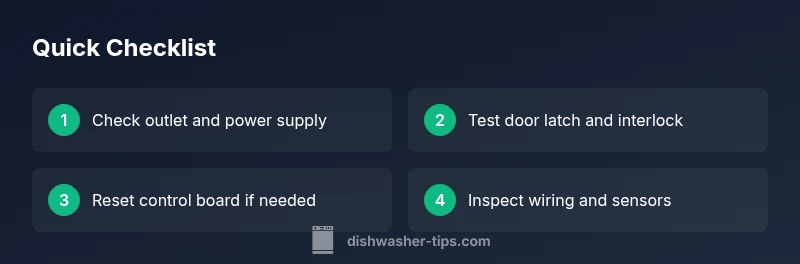
Most often, a dishwasher won't start due to a door latch, faulty control panel, or power issue. Check the power outlet and plug, ensure the door is securely latched, and reset the control board by unplugging for 60 seconds. If it still won't start, consult a pro to avoid electrical hazards.
Understanding why dishwasher won't start
Why this issue happens is typically a combination of power, door interlock, and control system problems. According to Dishwasher Tips, the most common reasons a dishwasher won't start are power supply problems, a faulty door latch or interlock, and a malfunctioning control panel. When you encounter the question of why dishwasher won't start, begin with quick, safe checks rather than diving into internals. The aim is to verify basic conditions before ruling out more complex faults. In practice, the most frequent culprits map to easy-to-test areas: the outlet, the door, and the start button. Ensuring the unit has power and the door is properly latched can often resolve the issue without tools. If the appliance still refuses to begin, the Dishwasher Tips Team recommends a structured approach to diagnosing the root cause rather than random replacements. This approach aligns with practical home troubleshooting and helps homeowners stay safe.
First checks you can perform safely
Before disassembling panels, perform the simplest checks. Make sure the dishwasher is plugged in and that the outlet is live by testing with another device. Inspect the circuit breaker or fuse box to confirm the circuit is on and not overloaded. Verify the door is closed completely and the latch engages when you press the start button. If the display shows nothing, note whether any lights come on when you press keys; lack of response often points to power or panel issues. Finally, make sure the water supply is not relevant to startup but verify hoses are connected and kink-free for future cycles. These quick checks address the most common causes of why dishwasher won’t start without tools and without risking safety.
Electrical power and control panel issues
Power supply problems are a leading cause of startup failure. Start by testing the outlet with a known-good device; if the outlet is dead, reset the home circuit and test again. Inspect the plug and cord for damage; even a loose or frayed cord can interrupt power to the control board. If the outlet is fine, the issue may reside in the dishwasher’s control panel or wiring harness. Look for scorch marks, disconnected plugs, or loose terminals at the control board. Some models display error codes on the panel—consult the manual or manufacturer site to interpret codes and determine whether the fault is software or hardware related. If the control board is suspected, professional replacement is recommended due to electrical safety concerns.
The door latch and interlock system
A faulty door latch or interlock can prevent a dishwasher from starting as a safety precaution. If the door interlock doesn’t detect a closed door, the unit will refuse to start regardless of the command. Test the door latch by closing the door firmly and trying a gentle push to see if the latch clicks into place. If the latch or interlock appears loose or damaged, it may need replacement. In some models, a failing interlock can also trigger intermittent starts or complete non-responsiveness. Avoid bypassing these safety features; a proper repair restores both safety and reliability.
Control board, firmware, and error codes
Modern dishwashers rely on electronic control boards and firmware to manage startup sequences. If startup issues persist, check for firmware updates or reset the control module. Some models support a soft reset by holding specific buttons or by unplugging for a minute; others require a factory reset via a service mode. Note any displayed error codes and consult the user manual or the manufacturer’s support site for interpretation. If codes indicate a hardware fault or if the reset does not restore starting function, professional diagnostics are advised to avoid data loss or further damage.
Water supply and sensors that influence startup
Although water supply primarily affects cycle readiness, certain sensors and inlets can influence startup behavior. Ensure the water inlet valve is not stuck and that the float switch moves freely, as a stuck float can falsely indicate a full tub and prevent startup. Check for kinks in hoses or blockages in the supply line, and verify that the water supply valve opens when the unit requests water. If sensors malfunction, your dishwasher might fail to start or proceed to a fault state. Addressing sensor or valve issues usually requires a technician, especially if internal components are involved.
When to call a pro and safety reminders
If basic checks don’t resolve the issue, it’s time to contact a pro. Electrical components, control boards, and internal wiring pose shock and fire risks; a trained technician can diagnose safely and prevent further damage. When scheduling service, provide the model number, a list of symptoms, and any codes observed. For prevention, keep a simple maintenance log and note changes in startup behavior over time. Regular inspections by a qualified technician can catch issues before they render the appliance unusable, saving money and frustration in the long run.
Steps
Estimated time: 25-40 minutes
- 1
Confirm power at the outlet
Unplug the dishwasher, wait 30 seconds, and plug back in. Check the circuit breaker and test the outlet with a simple device like a lamp to confirm power is live.
Tip: If the outlet is dead, do not continue troubleshooting the appliance. - 2
Test the door latch
Close the door firmly and listen for the latch click. If the latch feels loose or doesn’t engage, replace the interlock or latch assembly as needed.
Tip: Avoid slamming the door; misalignment can wear out the latch faster. - 3
Reset the control board
Power cycle the unit by unplugging it for a minute, then plug back in and try to start a cycle. If the display remains dark, check internal wiring or consult a professional.
Tip: Do not force a restart if there are visible burn marks or a burning smell. - 4
Inspect wiring and connectors
Carefully inspect the terminal blocks and harnesses for loose connections or corrosion. Reseat connectors securely and ensure no wires are frayed.
Tip: Power off before handling any wiring and avoid touching high-voltage components. - 5
Check start button and keypad
Ensure the start button responds when pressed and that any related display shows activity. If the keypad is unresponsive, it may need replacement.
Tip: Some models require a specific button combo to reset the keypad. - 6
Verify water inlet and sensors
Confirm the water inlet valve opens when the unit requests water and that the float switch moves freely. Blockages or sensor faults can prevent startup.
Tip: If water issues are suspected, avoid refilling the tub repeatedly—this is a separate fault area. - 7
Plan for professional service
If none of the above steps resolve the problem, safe professional diagnosis is recommended. Document symptoms, including when the issue started and any error codes observed.
Tip: Having model, serial number, and service history ready speeds up repair.
Diagnosis: Dishwasher won't start
Possible Causes
- highPower supply issue (outlet, breaker, plug)
- highDoor latch/interlock failure
- mediumControl panel or wiring fault
- lowSensor or valve fault (interlocks, float)
Fixes
- easyCheck outlet with a known-good device; reset circuit breaker if needed
- easyInspect door latch and interlock; replace if worn or damaged
- easyUnplug for 60 seconds to reset control board; reseat connectors
- mediumIf issues persist, schedule professional service for diagnostic repair
People Also Ask
What is the first thing to check if the dishwasher won't start?
Begin with power and door latch checks. Verify the outlet works and the door closes securely. If these basics fail, move to the control panel and wiring diagnostics.
First check power and door latch. If the outlet is live and the door latches properly, proceed to inspect the control panel and wiring.
Can a blown fuse or tripped breaker stop a dishwasher from starting?
Yes. Check the home circuit and reset any tripped breakers. If breakers repeatedly trip, there may be an overload or a fault in the appliance.
Yes, a blown fuse or tripped breaker can prevent startup. Reset the breaker and check for overloads.
Is it safe to reset the dishwasher by unplugging it?
Power cycling by unplugging for a minute is generally safe and can clear minor software glitches. Do not attempt this if you smell burning or see damage.
Yes, unplugging for a minute to reset is usually safe, but avoid it if there are signs of damage.
Why does my dishwasher start sometimes and not others?
Intermittent starts often point to a worn door interlock, loose wiring, or a flaky control panel. Inspect connectors and listen for latch engagement on every attempt.
If it starts sporadically, check the door latch and control panel for wear or loose wires.
When should I call a professional?
If you see damaged wiring, a burnt smell, water leaks, or persistent non-start conditions after basic checks, schedule professional service to avoid safety risks.
Call a professional if wiring looks damaged, you smell burning, or it still won't start after basic checks.
Can hard water impact a dishwasher's startup?
Hard water mainly affects sensors and mineral buildup over time. Startup issues are less common, but mineral deposits can impact sensors or valves in some models.
Hard water can cause sensor issues over time and might affect startup in rare cases.
Watch Video
What to Remember
- Start with power, then door latch checks
- Do not bypass safety interlocks
- Document symptoms for pro diagnostics
- Regular maintenance prevents startup issues