GE Dishwasher Not Starting: Troubleshooting Guide
Learn fast, safe steps to diagnose and fix a GE dishwasher that won’t start. From power checks to latch issues, this Dishwasher Tips guide covers practical, step-by-step solutions.


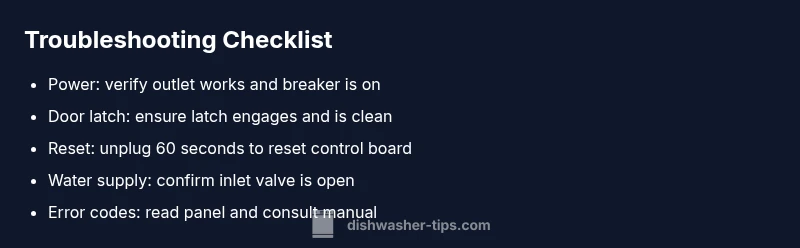
Most GE dishwasher won’t start are caused by power supply issues, a tripped breaker, a faulty door latch, or a control panel fault. Start with quick checks: verify the dishwasher is plugged in, check the circuit breaker, reseat the door latch, and perform a 60-second reset by unplugging the unit. If this does not fix it, continue with the diagnostic flow below.
Quick Safety Checks and Power Basics
If your GE dishwasher not starting, start with safety and power checks. The most common causes are simple power issues rather than internal mechanical failures. According to Dishwasher Tips, the fastest path to a fix is to confirm the unit is powered, protected by a working circuit, and properly plugged in. Before you touch any internal components, unplug the unit or switch off the circuit breaker if you smell burning or see arcing. Once you’ve cut power, replug or flip the breaker to re-establish power flow and observe whether any lights on the control panel illuminate. If nothing responds, you’ll progress to more targeted checks. For renters, check that the switch or outlet isn’t controlled by a wall switch or a GFCI-protected outlet hidden behind cabinets.
Common GE-specific starting issues
Many GE dishwashers fail to start due to simple, user-serviceable problems. In practice, the most frequent culprits are power-related, latch faults, or a stale reset. This section aligns with what the Dishwasher Tips team would emphasize: start with the basics before diving into complex diagnostics. If you hear no beep, see no lights, and the keypad is completely unresponsive, the issue is almost always electrical or a latch/lock problem rather than a failed motor.
What to gather before diving deeper
Before you proceed, note your model number, check for any error codes or blinking LEDs on the control panel, and confirm whether you recently experienced a power outage or tripped breaker. Having the model number helps you locate the exact diagram for wiring and latch components. If you’re a renter, verify that the unit isn’t sharing a circuit with high-draw appliances (like a microwave) that could trip the breaker during startup.
Safety-first reset approach
Resetting the control board can clear transient faults. Try a simple power reset: unplug the dishwasher or switch off the circuit for 60 seconds, then restore power and try starting a cycle. If the control panel remains dark or unresponsive after the reset, move to the next diagnostic steps. Never bypass safety interlocks or force the door latch during operation; this can cause damage or leaks.
When safety checks reveal no power
If there’s no power after resetting, test the outlet with a lamp or a phone charger to confirm whether the receptacle is live. If the outlet is dead, the likely fix is a circuit-breaker reset, replacement GFCI, or rewiring by a qualified electrician. If you confirm power at the outlet but the dishwasher still won’t start, the problem is likely inside the unit—door latch, wiring, or control board—and warrants deeper testing or professional help.
Quick checks for renters and apartments
In rental units, sometimes a wall switch controls the kitchen outlet, or a GFCI outlet is tucked away in a cabinet. Check for any nearby switches or GFCI outlets that could cut power to the dishwasher. If you identify a tripped GFCI, restore it and try a cold start cycle. If the appliance still refuses to start, proceed with the diagnostic flow below.
Summary of safe practices
Always unplug before inspecting electrical connections, never force the door, avoid contact with water and live components, and consult a professional if you smell burning, hear buzzing, or see signs of arcing. This approach helps protect both you and your GE dishwasher while guiding you toward a durable fix.
Steps
Estimated time: 20-45 minutes
- 1
Verify power and reset
Confirm the unit is plugged in and the outlet has power. If possible, test with a different device. If the outlet is live, unplug for 60 seconds and plug back in to reset the control board, then attempt a cycle.
Tip: Keep your model number handy to check the manual for any model-specific reset steps. - 2
Check the door latch
Open and close the door firmly to confirm the latch engages. Inspect for damage or debris that could prevent a secure latch. If the latch seems loose or worn, replace it.
Tip: A misaligned door can prevent startup even if the panel lights up. - 3
Assess the power circuit
If the outlet tests OK, check the kitchen circuit breaker panel for a tripped breaker or a overloaded circuit. Reset the breaker fully and try a new cycle.
Tip: If other appliances repeatedly trip the same circuit, consider a dedicated outlet for the dishwasher. - 4
Inspect wiring to the control board
With power off, gently reseat the connectors on the control board and look for loose wires or corrosion. Do not force connectors; replace damaged harnesses as needed.
Tip: Handle connectors by the plug, not the wires, to avoid damaging pins. - 5
Check for error codes
Watch the control panel for blinking lights or audible beeps. Cross-check with the GE manual to interpret codes and perform specified actions.
Tip: Even a single blinking pattern can guide you to a specific fault. - 6
Decide on next steps
If the dishwasher still won’t start after these steps, call a technician. Some faults (control-board failures, heater faults) require professional tools and diagnostic expertise.
Tip: Document any codes and the steps you took to help the technician.
Diagnosis: GE dishwasher not starting
Possible Causes
- highPower supply issue (outlet, circuit breaker, or GFCI trip)
- highFaulty door latch or door switch
- mediumControl panel or user interface fault
- lowLoose wiring or blown fuse inside the unit
Fixes
- easyTest the outlet with a lamp or other device; reset the circuit breaker or GFCI; ensure the dishwasher is securely plugged in
- easyInspect the door latch for wear or damage; clean the latch area and reseat the latch; replace if springs or hooks are weak
- easyUnplug the dishwasher for 60 seconds to perform a hard reset of the control board; plug back in and attempt a new cycle
- mediumInspect internal wiring connections to the control board; reseat connectors if loose and look for signs of corrosion or damage
- mediumIf error codes appear, consult the GE manual for exact meanings and follow the recommended corrective actions
People Also Ask
Why won’t my GE dishwasher start after a power outage?
Power outages can reset the control board or trip breakers. Check the outlet, reset the breaker, and perform a power reset on the dishwasher. If it still won’t start, progress through the diagnostic flow and verify latch and wiring.
After a power outage, reset the breaker and the dishwasher, then check the latch and wiring. If it still won’t start, continue with the diagnostic steps.
How can I tell if the door latch is the problem?
A failing latch often prevents startup even if the keypad is responsive. Look for visible wear, misalignment, or a latch that doesn’t click into place. Replace the latch if it seems damaged.
If the latch doesn’t click firmly when the door closes, or you hear it loosen, that’s a strong sign of a latch problem. Replace as needed.
Is it safe to reset the GE dishwasher by unplugging it?
Yes, unplugging for about 60 seconds is a common, safe reset method for many GE models. Reconnect and try a cycle. If it still won’t start, proceed with further diagnostics.
Yes, you can safely unplug it for about a minute to reset, then plug back in and test a cycle.
What do error codes on the GE panel mean for not starting?
Error codes guide you to specific faults, such as door latch, water inlet, or control-board issues. Refer to the manual to interpret the exact code and follow the recommended action.
Error codes point to particular faults; check the manual for the meaning and follow its steps.
When should I call a professional for a GE dishwasher not starting?
If basic power and latch checks don’t resolve the issue, or you notice burning smells, leaks, or wiring concerns, a professional technician should inspect and repair the unit.
If simple resets and checks don’t fix it, or you notice signs of damage, it’s time to call a pro.
Can a faulty float switch prevent the unit from starting?
A malfunctioning float switch typically affects filling and operation rather than initial start. If the control panel lights but the cycle won’t advance, consider inspecting the inlet valve and float assembly.
A bad float switch mainly affects filling, but it can hide behind start issues if the system is blocked.
Watch Video
What to Remember
- Identify power issues first before dive into mechanical checks
- Door latch integrity is a frequent not-start culprit
- Resetting the control board can clear transient faults
- Consult the manual if error codes appear
- Call a pro if electrical or control-board symptoms persist