How to Start GE Dishwasher
Learn how to start a GE dishwasher safely and reliably with a step-by-step startup process, maintenance tips, and troubleshooting for common startup issues.


Learn how to start a GE dishwasher quickly and safely. This quick guide covers verifying power and door latch, confirming the water supply, resetting controls, and running a test cycle to confirm startup. Use these steps to diagnose common startup problems before calling service. You’ll learn what to check if the display is blank, the motor doesn’t run, or the cycles stall.
GE Dishwasher Startup Essentials
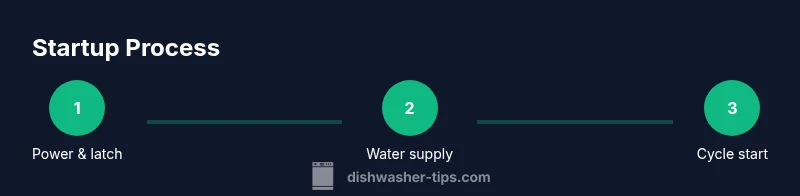
Starting a GE dishwasher properly begins with a quick safety check and confirming basic hardware are ready. According to Dishwasher Tips, most startup issues stem from power, door latch, or water supply problems, not from the electronics themselves. The Dishwasher Tips team found that when you walk through a simple pre-start routine, you reduce unnecessary service calls and improve cycle reliability. In this section we cover the core prerequisites, how to verify each item, and what to do if you encounter a blank display or a non-responsive control panel. We'll reference simple tests you can perform with common household tools and household water pressure expectations. This approach keeps you in control and minimizes guesswork while you troubleshoot. Remember: always unplug before poking around live components and never force a panel open.
Safety First: Power, Door Latch, and Circuit Basics
Power and safety come first. Before you touch any internal components, ensure the dishwasher is completely powered off and unplugged or disconnected from the circuit. Check that the outlet is live using a simple plug-in tester, and verify the circuit breaker or GFCI outlet feeding the dishwasher hasn’t tripped. The door latch must engage fully; a dented latch or misaligned door can prevent the dishwasher from starting even if you press a button. If the display is blank, this is often a sign of power or latch issues rather than a motherboard fault. If you notice overheating or a burning smell, stop and unplug the unit immediately and seek professional help. Following these checks drastically reduces the risk of shock or damage to control boards.
Water Supply and Inlet Valve Check
A dishwasher must receive water to start the wash cycle. Confirm the water supply valve is fully open and the hose is not kinked or bent. Inspect the inlet valve for debris or mineral buildup that could restrict flow. If you have hard water, mineral deposits can accumulate and mimic a valve failure. If the valve feels stiff when you turn it, it may need cleaning or replacement by a technician. This step is often overlooked, but without proper water supply, the dishwasher may not initiate even though the electronics are functioning.
Control Panel and Cycle Selection
GE models can be sensitive to how cycles are chosen and how the start button is engaged. Ensure you’ve selected a cycle that matches your load and that the start button or options dial is fully engaged. Some models require you to press and hold the start button for a moment to initialize, while others respond to a simple press. If there are any error codes, consult the user manual for the exact meaning and recommended action. Modern GE dishwashers may display error codes that guide you to the faulty component, saving you time.
Resetting and Clearing Errors on GE Dishwashers
If the dishwasher won’t start due to a temporary glitch, resetting the control board can resolve the issue. A common approach is to power down the unit for 60 seconds by unplugging or turning off the breaker, then restoring power. Some GE models require a specific button sequence to reset; check your model’s manual for the exact steps. Resetting clears transient errors and returns the unit to a known state, which is often all that’s needed to get a stalled dishwasher running again.
Float, Flood, and Door Lock Diagnostics
A stuck float or failed flood switch can prevent startup by signaling an overflow condition in the sump. Look behind the lower access panel and check that the float moves freely and isn’t obstructed. A mispositioned float plug or a damaged floater arm can give false overflow readings. Another common startup blocker is a damaged door lock. If the lock does not engage or repeatedly unlocks during the cycle, the machine will not start. Inspect connectors for corrosion or loose wiring and reseat them if you’re comfortable doing so.
Running an Empty Cycle to Verify Start
Once you’ve checked power, water, and door latch, run an empty cycle to verify the dishwasher starts correctly. Place no dishes inside and select a basic cycle (eco or normal, depending on model). Observe the display; you should hear the pump start and the motor hum as the cycle begins. If the appliance sounds off or stalls, note the symptom, as it points to a specific subsystem (electrical, water, or sensors). Refrain from opening the door mid-cycle, as this can disrupt sensors and fill levels.
Common Startup Issues and Quick Fixes
If the display is blinking or not lighting up, check the power source and door latch first. A tripped circuit breaker or GFCI can prevent any startup; reset and test again. If the motor won’t start after a confirmed power-on, inspect the door lock and wiring harness for looseness or corrosion. For a non-drying or not-cleaning issue that relates to startup timing, verify that the dishwasher is receiving proper water pressure and that the spray arm is not blocked. Most startup problems resolve with one or two targeted checks rather than a full service call.
Routine Maintenance to Prevent Startup Problems
Prevention reduces startup failures. Regularly inspect power cords, hoses, and the inlet valve for signs of wear. Use a descaler or hard-water treatment if you notice mineral buildup on fittings. Clean the door latch and rubber gasket to ensure a tight seal. Run a monthly empty cycle with a sanitizer option if available to minimize buildup. Keeping filters and spray arms clean maintains consistent water flow, which helps with reliable startup and a better overall wash.
What to Do If the Dishwasher Still Won’t Start
If you’ve methodically checked power, latch, water supply, and control panel and the unit still won’t start, it’s time to call a technician. A professional can diagnose more intricate issues such as control board faults, sensor failures, or wiring harness problems that aren’t user-serviceable. When you contact service, provide the model number, any error codes, and a brief description of the steps you’ve already performed. This information helps the technician arrive prepared, reducing diagnostic time and cost.
Authority Sources and Further Reading
For additional guidance on safe operation, energy efficiency, and generic startup principles, consult credible sources and manufacturer manuals. This section consolidates reputable references to help you verify best practices and stay informed about appliance safety and maintenance. Reference materials and guides from established institutions can deepen your understanding of how dishwashers operate and how to maintain them over time. For most users, following manufacturer recommendations and safety precautions will deliver the best long-term results.
Tools & Materials
- Flat-head screwdriver(Needed for panel screws on many GE models)
- Phillips-head screwdriver(Electronics access and panel screws)
- Needle-nose pliers(Useful for disconnecting wires if needed)
- Multimeter (voltage tester)(If you suspect loose wiring or power issues)
- Towel or small tray(Protect floor and catch drips)
- Bucket or basin(Catch any leaking water during valve checks)
- Safety gloves(Hand protection when handling panels)
- Flashlight(Illumination behind panels or in low light)
- Owner's manual(Model-specific instructions and error codes)
Steps
Estimated time: 60-90 minutes
- 1
Check safety power and door latch
Verify the dishwasher is unplugged or the circuit is off before touching any components. Confirm the outlet is live with a tester. Ensure the door latch engages fully when closed. A loose latch or dead outlet commonly prevents startup.
Tip: Test the outlet with a small lamp to confirm power before inspecting internals. - 2
Inspect water supply and inlet valve
Make sure the water valve is fully open and the hose is not kinked. Check for mineral buildup on the valve screen; clean gently if present. Without adequate water flow, the unit may fail to start or stall during cycles.
Tip: Turn off the water supply before disconnecting hoses to avoid leaks. - 3
Test the control panel and cycle selection
Confirm you’ve chosen a valid cycle and that the start button or dial engages fully. Resets often clear a glitch that prevents startup. If errors appear on the display, note them for reference.
Tip: Hold the start button for 1–2 seconds if your model requires a press-and-hold. - 4
Reset the dishwasher controls
Power down the unit for 60 seconds (unplug or switch off the breaker), then restore power. Some GE models require a specific reset sequence; consult the manual for exact steps. A reset can clear transient sensor or communication faults.
Tip: If you can’t unplug, flip the breaker off and on again rather than forcing panels. - 5
Check float and flood sensor
Open the lower access panel and ensure the float can move freely. A stuck float or a failed flood switch can trigger an overflow condition that prevents startup. Inspect the wiring to these sensors for signs of wear or moisture.
Tip: Wipe moisture around these sensors to avoid false readings. - 6
Run an empty test cycle
With no dishes inside, select a basic cycle and start the unit. Listen for the pump hum and watch for water fill. If the machine makes unusual noises or fails to fill, note the symptom for targeted diagnosis.
Tip: Do not open the door mid-cycle; this can disrupt sensors. - 7
Read error codes and consult the manual
If an error code appears, cross-check its meaning in the GE model manual. Codes point to specific subsystems (door lock, sensor, or control board) and help isolate the cause.
Tip: Keep a small log of codes and timestamps for service visits. - 8
Decide on next steps
If startup now works, you’re done. If not, assess whether a non-warranty repair is feasible or if you should contact service. Prepare model details and a concise symptom summary for the technician.
Tip: Document model number, serial, and firmware version if prompted.
People Also Ask
Why won't my GE dishwasher start after pressing the start button?
Common causes include a faulty door latch, a tripped circuit, or an electrical fault. Verify the latch, reset power, and confirm the outlet is supplying power before pursuing more complex diagnostics.
If the start button doesn't respond, first check the door latch and power supply, then reset the unit and try again.
How do I reset GE dishwasher controls?
Power down the dishwasher for 60 seconds by unplugging or switching off the circuit breaker, then restore power. Some models have a specific reset sequence; check the manual for exact steps.
Turn off power for a minute, then turn it back on to reset the controls.
Is it safe to run the dishwasher if the door latch is loose?
No. A loose or malfunctioning latch can allow the door to reopen during a cycle, causing leaks or the unit to stop. Repair or replace the latch before running cycles.
Don’t run it with a loose door latch; repair first.
What does a blinking start indicator mean?
A blinking indicator usually signals an error or an unlatched door. Check the door, then refer to the manual for the error code if displayed.
A blinking light often means there’s an error or the door isn't fully closed.
When should I call a technician?
If power, latch, water supply, and control resets don’t resolve startup issues, a professional inspection is recommended to diagnose control boards or wiring faults.
If troubleshooting doesn’t fix it, it’s time to call a technician.
Watch Video
What to Remember
- Verify power and door latch before any start
- Check water supply and inlet valve for proper flow
- Use a controlled reset to clear transient faults
- Test with an empty cycle to confirm startup
- Document and escalate unresolved issues