LG Dishwasher AE Fault Code Troubleshooting Guide
Urgent guide to diagnose and fix the LG dishwasher fault code AE. Learn quick resets, protective steps, and a clear diagnostic flow to get your dishwasher back to normal safely.


AE on LG dishwashers signals a system fault detected by the control board. The quickest fix is a power reset, then verify the door latch, water supply, and key wiring. Run a test cycle to confirm. If AE reappears, consult LG support or a qualified technician to avoid water damage or electrical hazards.
What AE Means on LG Dishwashers
The AE fault code on LG dishwashers is displayed when the machine detects a system fault that interrupts normal operation. Because the fault involves electronics and sensors, the exact meaning can vary by model year and firmware. In practical terms, AE indicates a fault that the control board cannot resolve on its own without checking several subsystems in tandem. The Dishwasher Tips Team emphasizes that AE is not something to ignore; it typically requires a methodical check of power, connections, and basic components before moving to professional service. By treating AE as a sensor/control issue rather than a mechanical fault, you can triage safely and quickly. Always reference your model’s user manual for model-specific error interpretations and follow the manufacturer’s safety guidelines.
When you see AE, start with the basics: ensure the unit is powered, the door is closed properly, and the water supply line is ready to feed the cycle. If you recently had a power outage or surge, a reset may clear transient faults that trigger AE. Throughout this process, keep the area dry and avoid probing into live electronics. This approach aligns with best practices from Dishwasher Tips, which recommends a disciplined sequence to prevent further damage while you determine whether the issue is user-serviceable.
Understanding AE as a fault code helps homeowners differentiate between a temporary hiccup and a persistent fault. If a persistent AE occurs after safe reset and inspection, this is a strong signal that professional diagnostic tools are required. In many cases, a service call will address the fault more quickly and safely than an improvised home repair, especially when control boards, wiring harnesses, or sensors are involved.
For articles and model-specific guidance, consult LG’s official troubleshooting resources and warranty terms. The key is to document when AE appears, what actions were taken, and whether any audible alerts or water leaks accompany the error. This information speeds up remote support or on-site diagnostics and reduces guesswork during an in-person visit.
200
Steps
Estimated time: 45-60 minutes
- 1
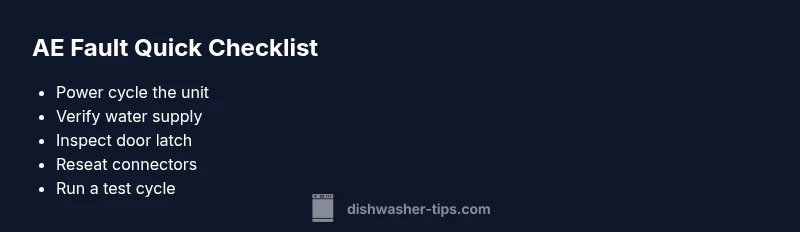
Power cycle and reset the dishwasher
Unplug the dishwasher from the wall outlet. Wait 5 minutes to allow capacitors to discharge. Plug back in and close the door. This reset can clear minor firmware glitches that trigger AE.
Tip: If the outlet is switched, ensure the circuit is fully powered off for the full 5 minutes. - 2
Verify power and water supply
Confirm the dishwasher is receiving power and that the water supply valve is fully open. AE can appear if the device detects no water flow during a cycle. Check for kinks in supply hoses and ensure the water inlet screen isn’t clogged.
Tip: Turn off the water supply, disconnect the hose, and visually inspect for blockages before reconnecting. - 3
Inspect the door latch and gasket
A faulty or misaligned door latch can trigger AE. Open and close the door firmly, listen for a secure latch, and inspect the latch mechanism and gasket for wear.
Tip: Wipe the latch components clean and apply a light silicone lubricant if the latch feels stiff (avoid getting lubricant on the gasket). - 4
Check major connectors and harnesses
Access the control board area and reseat all plug-in connectors firmly. Look for damaged or corroded terminals, bent pins, or loose connectors in the wiring harnesses that connect sensors to the control board.
Tip: Do not force connectors—gently reseat and confirm a click when fully seated. - 5
Run a test cycle to confirm
After reseating connections, perform a short test cycle (no dishes) to see if AE recurs. Monitor for any error codes or unusual noises.
Tip: Watch closely for leaks or unusual vibrations during the cycle. - 6
Decide on professional service
If AE persists after the above steps, the fault is likely tied to the control board or a sensor network. Schedule service with LG Support or a qualified technician.
Tip: Request a diagnostic visit with a detailed failure report and any cost estimates before work begins.
Diagnosis: Dishwasher displays AE fault code and won’t start or completes only partial cycles
Possible Causes
- highTransient power fluctuation or surge
- mediumLoose or corroded wiring harness connections
- mediumFaulty door latch or misalignment
- lowControl board firmware glitch or sensor communication error
Fixes
- easyPower cycle the unit by unplugging for 5 minutes, then plug back in and run a test cycle
- easyCheck and reseat all major wiring harness connections behind the access panel
- easyInspect the door latch for alignment, wear, or damage; replace if necessary
People Also Ask
What does AE mean on LG dishwasher fault codes?
AE is a fault code indicating a system error detected by the control board. It often points to electronics, sensors, or wiring issues rather than a purely mechanical defect. Always check power, door latch, and water supply first before assuming a component failure.
AE signals a system error in the dishwasher’s electronics. Start with a reset and basic checks before calling for service.
Can I fix AE myself, or do I need a professional?
Many AE issues can be troubleshooted at home with a safe power reset, door latch check, and connector reseating. If AE persists after these steps, or you are uncomfortable working around electrical components, contact LG Support or a certified technician.
If AE persists after basic checks, it’s best to call a professional for a safe, accurate diagnosis.
Will AE indicate a leak or water damage?
AE can accompany sensor or electronics faults that may or may not involve leaks. If you notice water pooling, switch off power and water supply and inspect the base for dampness or spills. A professional should assess any potential leaks.
AE may happen with electrical faults, but always check for leaks if water is present.
How much does it cost to repair an AE fault?
Repair costs vary by model and fault source. Expect a diagnostic visit and potential parts replacement to range broadly; discuss an estimate with the technician before any work begins.
Costs depend on the fault; a diagnostic visit is typically required to provide an accurate estimate.
Is AE common across LG models?
Electronic faults show varying frequency by model year and firmware. Regular maintenance and timely resets can reduce the chances of AE recurring, but persistent codes usually need professional attention.
Electronic faults happen, but maintenance helps prevent them.
Watch Video
What to Remember
- Reset before opening hardware
- Check door latch and water supply first
- Firmly reseat connectors if you suspect a loose connection
- If AE persists, call LG Support for professional diagnostic