Samsung Dishwasher Code OC: Troubleshooting and Fix Guide
Urgent guide to understanding Samsung dishwasher OC, diagnosing causes, and step-by-step fixes for homeowners and renters. Learn safe troubleshooting, typical repair costs, and prevention tips to keep cycles running.


Samsung dishwasher code OC indicates an overcurrent fault, typically from a jam, motor overload, or failed pump. The fastest fix is to power cycle the machine, then inspect the drain pump and filter for obstructions. If OC persists after reset, unplug the unit and check wiring or call a qualified technician, per Dishwasher Tips.
What OC Means on Samsung Dishwashers
On Samsung dishwashers, OC is an electrical fault code indicating overcurrent. According to Dishwasher Tips, this means the control board detected a motor or pump drawing more current than normal during a cycle. OC can occur when a pump is jammed, the impeller is blocked, or a wiring connection shorts under load. The result is a temporary shutdown to protect components, often stopping the cycle and flashing the display. Because the fault is electrical, OC is not a simple 'dishes dirty' alert; it points to power or resistance problems in the motor, pump, or controller. Before you jump to replacement, run through a quick triage: power cycle the machine, inspect the bottom sump area for foreign objects, and verify the drain filter and impeller can spin freely. If the problem reappears after a reset, you’re looking at a deeper fault that may require part replacement or professional service.
Common Causes of OC (Overcurrent) on Samsung Models
Dishwasher Tips analysis shows OC faults are typically triggered by a blocked drain pump or jammed impeller, but other issues can cause the fault to appear. A clogged drain filter or a snared pump increases current draw, triggering the OC code. A failing or partially seized motor can also draw excess current, especially on startup. Wiring faults, loose connectors, or a degraded control board can mimic a pump fault by increasing resistance and current draw. In flat terms, OC is a symptom with multiple possible roots, so a systematic check helps narrow the culprit.
Quick Home Fixes You Can Try Now
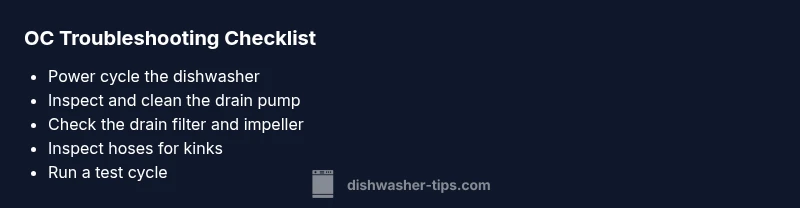
Begin with the simplest, safest steps to clear OC without tools. 1) Unplug the dishwasher or flip the circuit breaker, then wait 60 seconds and plug back in to reset the control board. 2) Inspect the bottom sump area: remove the lower rack and spray arm; check for foreign objects or food debris that could jam the pump impeller. 3) Check and rinse the drain filter; ensure it is properly seated and that the impeller spins freely. 4) Inspect the drain hose for kinks or clogs and ensure it connects securely to the drain. 5) Run a test cycle with no dishes to see if OC recurs. If the error returns, a deeper diagnosis is needed.
Step-by-Step Fix for the Most Likely Cause: Clogged Drain Pump
This focused repair targets the usual OC trigger: a clogged drain pump. Step 1: Power off and unplug the unit; for safety, switch off the circuit breaker. Step 2: Remove the bottom access panel and locate the drain pump; take pictures of wires before disconnecting anything so you can reconnect correctly. Step 3: Detach the pump housing and clear any debris from the impeller and filter screen. Step 4: Reassemble, reconnect all wiring, and reconnect power. Step 5: Run a short cycle with no dishes. Step 6: If OC persists, move to Step 2 of the diagnostic flow (drive unit check or pump replacement).
Other Causes and How to Address Them
If cleaning the pump doesn’t clear OC, explore other possibilities. A failing motor or pump may need replacement. A degraded or loose wiring harness or a faulty control board can trigger OC by drawing abnormal current. Check the wiring harness connections at the control board and pump for corrosion, looseness, or damaged wires. If you see obvious damage, replace the affected harness or board and perform another reset. In many cases, a professional service is needed for electronics-related faults.
Safety, Warnings, When to Call a Professional
OC faults can indicate real electrical danger. Always unplug or cut power at the breaker before opening access panels. Do not bypass safety features or operate the unit when you hear buzzing, smell burnt insulation, or see melted plastic. If you cannot locate and fix the root cause after basic checks, contact a qualified technician. Expect typical repair costs to range depending on the fault: parts replacement could be in the hundreds, while labor and diagnostics may add substantially to the bill. A pro can verify the control board, motor winding, and pump health with specialized tools.
Steps
Estimated time: 45-75 minutes
- 1
Power off and reset
Power off the unit at the outlet or breaker, wait 60 seconds, then restore power to reset the control board. This clears transient faults that can trigger OC.
Tip: If you can't reach the plug, switch off the dedicated circuit breaker. - 2
Access the drain area
Open the bottom panel and remove the lower rack to reach the drain pump and filter. Photograph wire connections before disconnecting any harnesses.
Tip: Keep a small container to hold screws and fasteners. - 3
Clear pump and filter debris
Remove debris from the impeller area and rinse the filter. Manually rotate the impeller to confirm it moves freely.
Tip: Do not use metal tools that could damage seals. - 4
Check hoses and clamps
Inspect the drain hose for kinks and ensure clamps are tight. A loose or blocked hose can cause backpressure and OC.
Tip: Disconnect and run water through the hose to test flow after reassembly. - 5
Reassemble and test cycle
Reconnect all components, restore power, and run a short cycle with no dishes to verify if OC reoccurs.
Tip: Document any abnormal noises or error patterns to share with a technician. - 6
Plan for professional if unresolved
If OC persists, arrange professional service to test motor windings and control board health, which may require replacement parts.
Tip: Always request a written estimate before any replacement work.
Diagnosis: OC code appears, cycle stops mid-run
Possible Causes
- highClogged/drained pump impeller
- mediumFaulty motor or pump overload
- lowWiring harness or control board issue
Fixes
- easyClean the drain filter and inspect pump impeller
- easyReset the dishwasher by power cycling
- mediumInspect and reseat wiring harness connections
- hardReplace drain pump or motor if required
People Also Ask
What does OC mean on a Samsung dishwasher?
OC stands for overcurrent. It signals the computer detected excessive current draw from the motor, pump, or related wiring during a cycle.
OC means overcurrent, signaling an electrical fault in the dishwasher's motor or pump.
Can I fix OC myself?
Some basic steps like resetting, cleaning the pump, and checking filters can resolve OC in some models. If the code returns, professional service is recommended.
You can try reset and cleaning steps, but if the OC code returns, call a pro.
Is OC dangerous to operate around?
OC indicates an electrical fault; unplug immediately and avoid operating the unit until the fault is diagnosed.
OC is a sign of an electrical fault—unplug and get it checked.
What parts are commonly involved in OC?
Common culprits include the drain pump, motor, control board, or wiring harness. Diagnosis should confirm which component is at fault.
Likely parts are the pump, motor, or control board.
How much does OC repair typically cost?
Repair costs vary by component and region, with parts and labor often totaling a mid-range range. Request a written estimate before any replacement.
Costs vary; get an estimate before repair.
Watch Video
What to Remember
- Power off before inspection and work safely.
- OC = overcurrent; most fixes involve cleaning and inspection.
- Resetting can clear transient faults; persistent OC needs professional help.
- Keep parts and wiring connections intact to prevent repeats.