Samsung Dishwasher Normal Light Blinking: Troubleshooting Guide
Urgent, practical troubleshooting guide for a Samsung dishwasher with a blinking normal light. Learn quick fixes, diagnostic flow, and when to call a pro to restore normal operation.


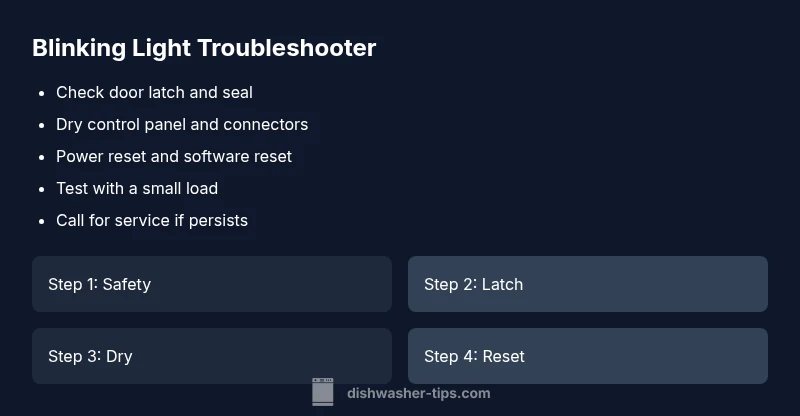
Most likely, the blinking normal light on a Samsung dishwasher signals a sensor or door latch issue. Start with fundamentals: ensure the door is fully closed, unplug the unit for a quick reset, and check for moisture on the control panel. If blinking persists, perform the guided reset and consider professional service for a sensor or control-board fault.
Understanding the blinking signal on Samsung dishwashers
Blinking lights on Samsung dishwashers are fault indicators, not just status indicators. While models vary, a blinking pattern typically points to a sensor, door latch, or control-board issue rather than a simple power interruption. According to Dishwasher Tips, a blinking light usually signals a fault that requires a targeted check rather than an everyday reset. Start by noting whether the blink is steady, intermittent, or rapidly repeated, as patterns help narrow down the likely cause. This section helps you recognize common blinking behaviors and prepares you to act safely and effectively.
Safety first: unplug, power down, and prep
Before you poke around inside a live appliance, power down completely. Unplug the unit at the wall outlet and wait 60 seconds to discharge any residual power. If your model has a dedicated reset button, consult the manual rather than forcing shortcuts. Wear protective gloves if you must touch metal edges. Keep children and pets away while you troubleshoot. These precautions reduce the risk of electric shock or water exposure during inspection.
Check the door latch, door seal, and door alignment
A door that isn’t fully closed or a misaligned latch is a common reason for blinking indicators. Inspect the latch catch for debris, inspect the door gasket for tears, and make sure the door closes with a solid, flat seal. If the latch won’t engage properly or the door sits unevenly, realign or replace it as needed. After closing, run a quick test cycle with the door firmly shut to see if the light behavior changes.
Inspect the control panel for moisture, residue, or damage
Moisture on the control panel or inside the microelectronics can trigger false fault reporting. Wipe the panel with a dry microfiber cloth, then inspect for condensation under the outer housing. Look for signs of corrosion around connectors and ensure no liquid spills reached the terminal area. If you see moisture, dry thoroughly before attempting a reset. Moisture is a frequent culprit behind erratic blinking.
Power cycle and reset procedures you can safely perform
A power reset is a simple, often effective, first step. Unplug the dishwasher, wait 5 minutes, then plug it back in and restart a cycle. If your model supports a software reset, follow the manual’s steps precisely. Do not shortcut with the power switch, as some models require unplugging to fully reset the control board. After the reset, observe whether the blinking pattern returns.
Diagnostic flow: from symptom to solution
When you observe a blinking light, use a logical flow to narrow the cause. Start with the most accessible checks (door latch, power, moisture) before moving to less obvious faults like sensors or wiring. Document the exact blink pattern and cycle stage (idle, fill, wash, drain) and compare it to the user manual or official support resources. If the light stops blinking after a reset, test a dishwasher load to confirm stability; if it reappears, move to targeted checks for sensors or wiring. This flow reduces unnecessary part replacements and speeds up resolution. Dishwasher Tips analysis shows that structured diagnosis helps homeowners save time and avoid costly service calls.
Common causes and practical fixes for blinking lights
Most blinking patterns originate from three broad areas: door latch and door alignment, moisture or condensation on the electronics, and control-board or sensor faults. The most frequent fix is a secure door latch, followed by a thorough dry-out of the panel. If moisture is detected, gently dry and re-seat any connectors. For sensor faults, professional testing is often required. In many cases, a firmware or software hiccup can be resolved by a factory reset or software update via the service menu. If you’re unsure, contact the manufacturer’s support line for model-specific guidance. Early intervention reduces the chance of water damage or motor issues.
When to call a professional and how to prepare
If the blinking persists after basic checks, it’s time to involve a technician. A professional can test the control board, sensors, and wiring harness for faults that aren’t visible. Prepare your model number, a brief description of the blinking pattern, and the service history. Ask about a diagnostic visit, typical costs, and whether replacement parts are needed. The Dishwasher Tips team recommends documenting the blinking pattern with timestamps and cycle phases to speed up diagnosis during service.
Prevention tips to avoid future blinking and extend life
Keep the door latch clean and aligned, and ensure the door seal remains intact. Avoid overloading; near-full loads create more door stress and moisture exposure. Regularly clean the filter and sump area to prevent debris from triggering sensors. Maintain a stable power supply by using a surge protector and avoiding extension cords. Finally, update firmware if your model supports it and follow Dishwasher Tips’ seasonal maintenance tips to prevent recurring faults.
Steps
Estimated time: 30-60 minutes
- 1
Confirm safety and power down
Unplug the dishwasher and wait for 5–60 seconds before handling any components. This reduces shock risk and prevents accidental moisture contact with live electronics.
Tip: If you can’t unplug easily, switch off at the circuit breaker first. - 2
Inspect the door latch and seal
Open and close the door slowly, listening for a solid latch click. Check the latch for damage and the door seal for tears or debris that could keep the door from sealing properly.
Tip: Remove food debris around the latch with a dry cloth. - 3
Check for moisture on the control panel
Wipe the panel with a dry microfiber cloth to remove moisture. Inspect nearby seams for condensation and ensure no liquid has pooled near connectors.
Tip: If you see moisture, dry thoroughly and wait a few minutes before testing. - 4
Perform a controlled reset
Plug the unit back in, then run a simple cycle or press the reset sequence as per the manual. Observe whether the light behavior changes after the reset.
Tip: Do not force a reset via power switch if the model requires unplugging. - 5
Test with a small load
Run a small, balanced load to see if the blinking recurs during operation. If it stops after a reset, monitor for pattern changes during the cycle.
Tip: Avoid heavy, unbalanced loads during troubleshooting. - 6
Assess need for professional service
If blinking persists after basic checks and a reset, schedule a service appointment for sensor or control-board testing.
Tip: Collect model number, serial, and a note of blinking frequency for the tech.
Diagnosis: Samsung dishwasher normal light blinking
Possible Causes
- highDoor latch not fully engaged
- mediumMoisture or condensation on control panel
- lowSensor fault (water level, optical, or door sensor)
- lowPower fluctuation or control-board issue
Fixes
- easyCheck door latch alignment and ensure the door closes fully.
- easyDry the control panel and reseat connectors if moisture is present.
- easyReset the control board by unplugging for 5 minutes and reconnecting.
- hardIf blinking continues, consult a professional for sensor/board testing.
People Also Ask
What does a blinking light mean on a Samsung dishwasher?
A blinking light usually indicates a fault in the system, such as the door latch, moisture on the control panel, or a sensor/board issue. Start with the basics and document the pattern.
A blinking light usually means a fault in the system like the door latch or sensor. Start with the latch and moisture checks, then reset if needed.
Is unplugging for reset safe?
Yes. Unplugging for about 5 minutes allows the control board to reset. If the model requires, also perform a standard reset following the manual.
Yes, unplug for about five minutes to reset. Follow your manual if a different reset step is recommended.
Can moisture cause blinking?
Yes, moisture on the control panel can trigger false fault reports. Dry thoroughly before testing again and ensure connectors are dry.
Moisture can cause false faults, so dry the panel and connectors before retesting.
When should I call a technician?
If blinking persists after basic checks and resets, a technician should test the control board, sensors, and wiring harness.
If the light keeps blinking after you’ve tried the basics, it’s time to call a technician for a deeper check.
Is it safe to run a cycle while blinking?
Avoid running cycles until you’ve diagnosed or cleared the fault. Running a cycle may worsen underlying issues.
No—don’t run a cycle until you’ve checked the fault with basic diagnostics.
Watch Video
What to Remember
- Blinking light signals a fault—start with latch and power checks.
- Document blink patterns to speed diagnosis.
- If unresolved after basics, call a professional.
- Regular maintenance reduces blinking incidents.