Dishwasher E4 Error: Urgent Troubleshooting Guide
Urgent guide to diagnose and fix the dishwasher E4 error. Learn meaning, common causes, quick home fixes, cost ranges, and when to call a pro to prevent water damage.


E4 is a drainage fault that halts the wash cycle to prevent overflow. In many models, the error points to a clogged filter, a blocked drain hose, or a failing drain pump. The quickest fixes are cleaning the filter and sieve, clearing the drain, and ensuring the pump can run. If water remains, professional service may be required.
Understanding E4: What the Error Means for Your Dishwasher
When you see the E4 code on your dishwasher, it usually signals a drainage fault that stops the cycle to prevent overflow. The Dishwasher Tips team emphasizes that E4 is more a symptom than a single failure point; it points to water not exiting the tub properly. In most common brands, E4 can appear after a pump jam, a clogged filter, or a kinked drain hose. Treat E4 as a warning to inspect the drain pathway and water removal components first, before moving on to more complex electronics. Recognizing E4 early can prevent water damage under the appliance and the costly repairs that follow.
According to Dishwasher Tips Analysis, 2026, drainage faults are the leading cause of mid-cycle stoppages associated with E4, so starting with the drain system often yields the fastest resolution. If you’re troubleshooting, keep in mind that 2–3 simple checks can resolve the majority of home fixes for the dishwasher e4 error.
Symptoms You Might See with E4 on Your Dishwasher
The most common signs of an E4 drainage fault include water remaining at the bottom of the tub after a cycle, the machine stopping mid-cycle, and the control panel flashing E4 or beeping. Some models display a single tone alert followed by the error code, while others show an E4 and automatically drain attempts. It’s typical to notice a faint odor of stagnant water or dishwater near the base of the unit if the drain path is partially blocked. If you recently switched detergents or additives, consider whether residue could contribute to a clog or sudsing that interferes with proper drainage.
Noting when E4 occurs (after a specific cycle, with heavy loads, or after adding certain detergents) helps narrow down the likely causes and speeds up the fix. Keep a log of symptoms, noises, and water level when troubleshooting to share with a technician if needed. Dishwasher Tips recommends documenting the sequence of events to avoid repeating steps that don’t resolve E4.
The Most Likely Causes of E4 Drainage Fault
Most drainage faults behind the E4 error stem from a blocked path or a non-working pump. The top culprits are: 1) Clogged or damaged drain filter and sump screen that prevent water from reaching the pump; 2) A kinked, clogged, or blocked drain hose that traps wastewater inside the tub; 3) A failing drain pump with worn impellers or a seized rotor; 4) Debris in the check valve that slows drainage. Less common but possible causes include a faulty door switch or a damaged wiring connection to the drain components. Knowing the relative likelihood helps you prioritize the fixes that deliver results fastest.
Quick Home Diagnostic Checklist
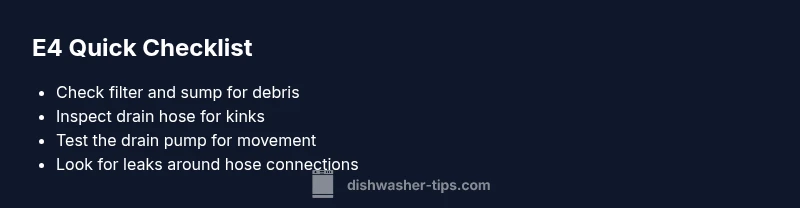
- Unplug the machine and open the bottom access panel to inspect the filter and sump area. Look for peeling seals, glass shards, or food debris that could be blocking drainage.
- Remove and rinse the drain filter and any sieve screens; clean all debris from the sump area and spray jets.
- Inspect the drain hose for kinks, twists, or stiffness; ensure it runs to the sink air gap or disposal without obstructions.
- Listen for the drain pump when starting a cycle with a small amount of water; a humming sound that doesn’t move water may indicate a pump issue.
- Check the pump housing for clogs or a stuck impeller; if you can see obstruction, clear it carefully with tools appropriate for your model.
Step-by-Step Fix for the Most Common Cause: Clean Filter & Clear Drain Path
- Power down and unplug the dishwasher. 2) Remove the bottom access panel and take out the filter assembly. 3) Rinse the filter under warm water, removing all debris. 4) Reassemble, run a short cycle to clear residual sludge. 5) Inspect the drain hose for kinks; straighten any that are bent and ensure proper routing to drainage.
Tip: Have towels ready; water may spill when you remove panels.
Alternative Causes and How to Verify Them
If cleaning the filter and hose doesn’t resolve E4, the issue may be a failed drain pump, a clogged check valve, or a wiring fault. Verify the pump motor spins freely—if the impeller is jammed or the motor overheats, you’ll hear a stall or a burn smell. Check the electrical connections to the pump and ensure the control board is sending the right signal. A loose connector or corroded contact can mimic pump failure. If you spot burn marks or a melted connector, stop and call a pro.
Safety, Costs, and When to Hire a Professional
Dealing with electrical components inside a dishwasher requires caution. Always unplug the unit before opening access panels. If you’re not comfortable handling electrical connections, or if you encounter rust, damaged wiring, or a pump that won’t spin, contact a licensed technician.
Estimated cost ranges: drain filter replacement is typically inexpensive (roughly $5–$25 for parts); drain pump replacement can vary from $60–$150 for parts plus $80–$150 for labor. If a service call is required, expect total costs to range from $120 to $350 depending on your location and the model. These figures are general ranges and can vary; your appliance’s warranty or service plan may cover part of the repair.
Prevention Tips to Avoid E4 Recurrence
- Clean the filter and sump area monthly to prevent buildup.
- Use the correct amount of detergent and avoid powder detergents that leave residue in the filter.
- Check the drain hose for bends and ensure it is properly connected to the disposal or air gap.
- Run an empty cycle every few weeks to clear debris and verify the pump’s operation.
- If you frequently run large loads, consider spacing out heavy pots and pans to reduce strain on the drainage system.
Quick Wins If You’re in a Hurry
- Reset the dishwasher by unplugging for 60 seconds, then plug back in and run a test cycle with no load.
- Re-check the filter and hose after a reset; sometimes a reset clears a temporary electrical fault that triggered E4.
- Keep essential tools handy: a flashlight, towels, a small container, and the user manual for your model for reference while you work.
Steps
Estimated time: 25-45 minutes
- 1
Power down and access the drain area
Unplug the dishwasher, remove the bottom panel, and prepare for debris cleanup. This prevents electrical shock and makes it safe to inspect the filter area.
Tip: Have towels ready and work on a dry surface. - 2
Remove and clean the drain filter
Take out the filter assembly, rinse under warm water, and scrub away any sediment or food particles. Reinstall securely.
Tip: Check for cracks in the filter gasket and replace if worn. - 3
Inspect the sump and pump housing
Look for visible debris in the sump and ensure the pump impeller can rotate freely. Remove any obstruction with care.
Tip: Do not use metal tools that could scratch components. - 4
Check the drain hose for blockages
Disconnect the hose if needed and run water through it to confirm there’s no clog. Reattach securely without kinks.
Tip: Avoid tightening too much; ensure a gentle bend clear of sharp twists. - 5
Test the drain pump operation
Plug the unit back in and run an empty cycle. Listen for the pump’s hum and watch for proper draining.
Tip: If you hear grinding or no movement, prepare for pump replacement. - 6
Run a confirm cycle and monitor
Run another empty cycle to verify E4 does not reappear. Check for leaks around the bottom panel.
Tip: If E4 recurs, stop and call a professional with your diagnostics log.
Diagnosis: E4 error displayed, dishwasher stops mid-cycle
Possible Causes
- highClogged drain filter
- mediumDrain pump failure
- lowControl board malfunction
Fixes
- easyClean the drain filter
- easyCheck drain hose for kinks
- hardReplace drain pump
People Also Ask
What does the E4 error mean on a dishwasher?
E4 typically indicates a drainage fault where water cannot exit the tub. It’s a signal rather than a single component failure. Start with the drain path: filter, hose, and pump before moving to electronics.
E4 means your dishwasher can’t drain properly. Start by checking the filter, hose, and pump before touching any electronics.
Can E4 be reset by unplugging and plugging back in?
A power cycle can clear temporary faults and reset the control board in some models. If E4 reappears, the issue is likely mechanical (drain path) rather than a one-time glitch.
You can try a quick reset, but if E4 comes back, you likely have a drainage problem.
Is E4 dangerous or can I fix it myself?
E4 is not typically hazardous, but it involves water and electricity. If you’re comfortable, you can perform basic checks (filter, hose) safely with power off. Stop if you see damaged wiring or leaks and call a pro.
It’s not usually dangerous, but be careful with water and electricity. If unsure, call a pro.
How long does it usually take to fix an E4 error?
Simple fixes like cleaning the filter and hose can take 20–40 minutes. More complex repairs, such as pump replacement, may require a service call and longer time.
Most quick fixes take under an hour; tougher repairs can take longer and may need a pro.
Should I hire a professional for E4?
If basic checks don’t resolve E4, or if you’re uncomfortable with electrical components, it’s wise to hire a technician. Professionals can diagnose pump or wiring faults safely and efficiently.
If you’re not confident, it’s best to call a professional for E4.
How can I prevent E4 from coming back?
Regularly clean the filter, avoid overloading, ensure proper drainage hose routing, and run maintenance cycles to keep the drainage path clear.
Keep the drainage path clean and run periodic maintenance to prevent E4.
Watch Video
What to Remember
- Identify E4 as a drainage fault, not a single failed part
- Start with filter/hoses before pump or board checks
- Budget for part costs and potential service if needed
- Verify safety and power-off before any work
- Regular maintenance reduces recurrence of drainage issues